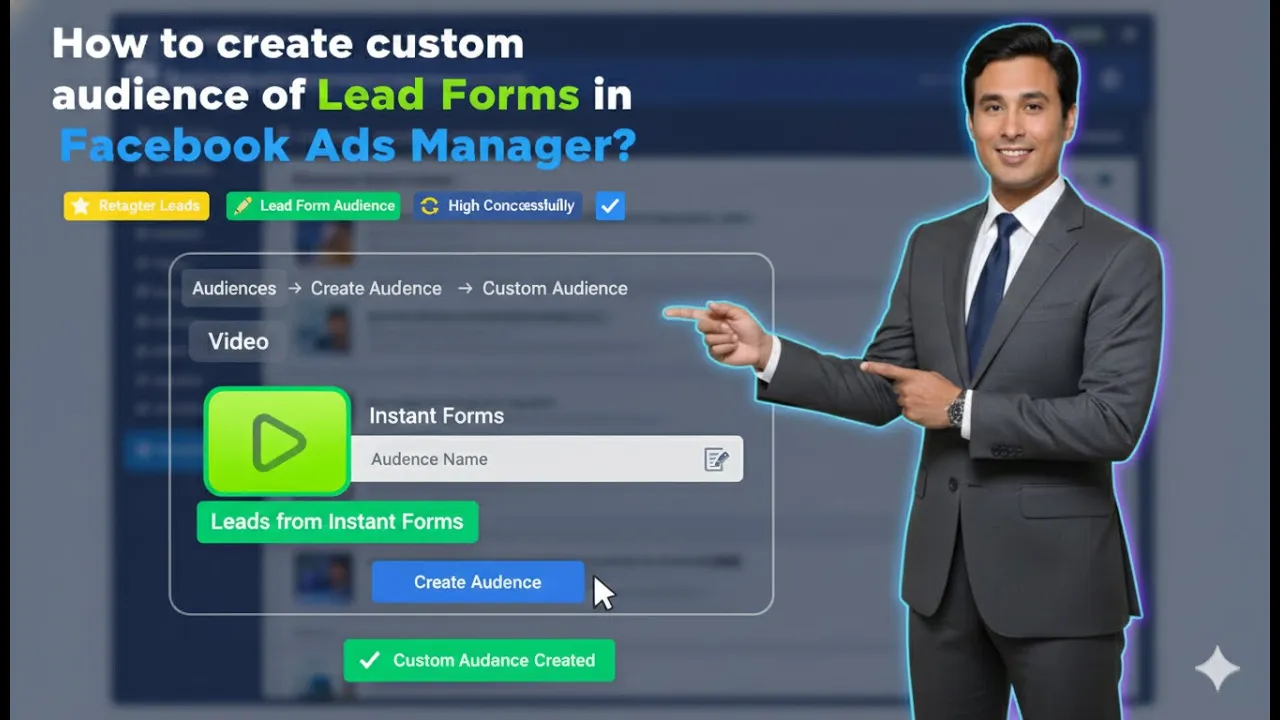
In this article, we are going to learn how to create a custom audience of lead forms as a data source in Facebook Ads Manager. Custom audiences are extremely useful when you want to retarget users who have already interacted with your ads in some way.
One of the most powerful data sources for retargeting is lead forms. When users open or submit a lead form, they show interest in your product or service. By creating a custom audience from lead forms, you can show retargeting ads to these users and increase conversions.
This article explains the complete process of creating a custom audience using lead forms, the different event options available, why each option is useful, and how retention works.
Understanding Custom Audience in Facebook Ads
A custom audience allows you to target people who have already interacted with your business. These interactions can happen through ads, forms, pages, or other engagement points.
When you use lead forms as a data source, you are creating an audience of users who have shown interest by opening or submitting your lead form. This audience can later be used for retargeting ad campaigns.
Where to Create Custom Audience in Ads Manager
To create a custom audience, you need to go to the Audiences section inside Meta Ads Manager.
Inside the audience section, you will find an option to create a new audience. This is the starting point of the process.
How to Create a Custom Audience of Lead Forms in Facebook Ads Manager?
Step 1: Go to the Audience Section
Open Ads Manager and Audience Tab
First, open Facebook Ads Manager and navigate to the Audience section. This section is specifically designed to manage saved audiences, custom audiences, and lookalike audiences.
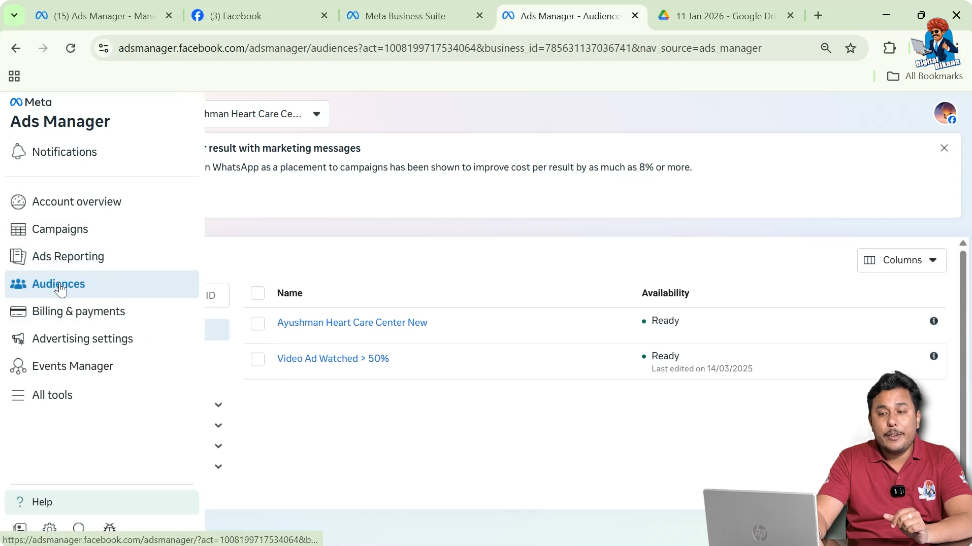
Step 2: Click on Create Audience
Select Custom Audience
Inside the audience section, click on the Create Audience button. From the available options, select Custom Audience.
This allows you to create an audience based on user interaction.

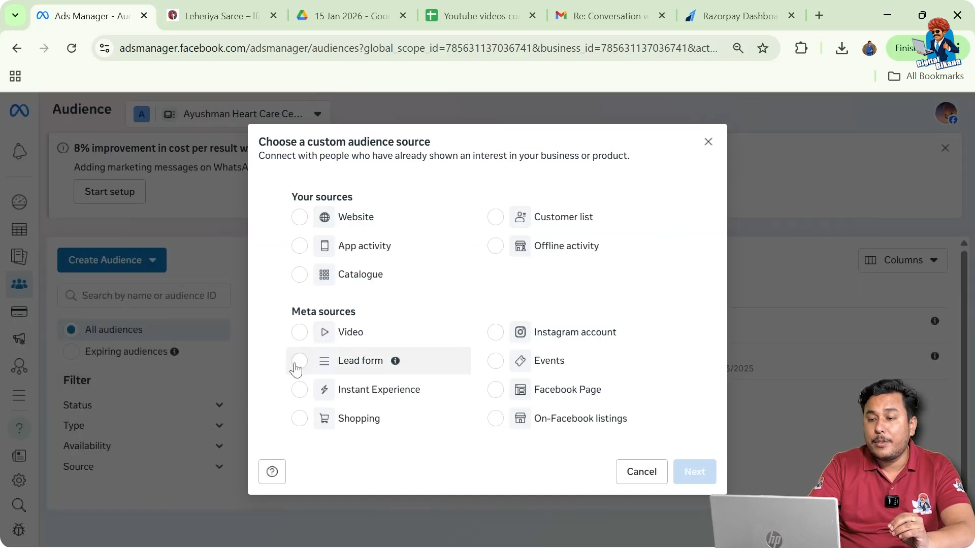
Step 3: Select Lead Form as Data Source
Choose Lead Form Option
After selecting Custom Audience, you will be asked to choose a data source. From the list of data sources, select Lead Form and then click on Next.
This means your custom audience will be created using lead form interactions.
Understanding Lead Form Events
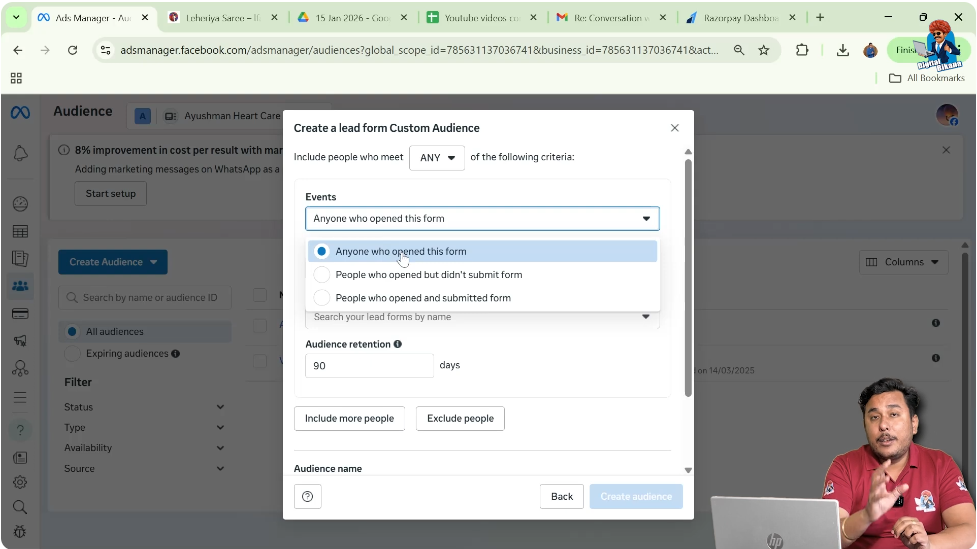
After selecting lead forms as the data source, Facebook asks you to choose an event type. This determines which users will be included in your custom audience.
There are three main event options available.
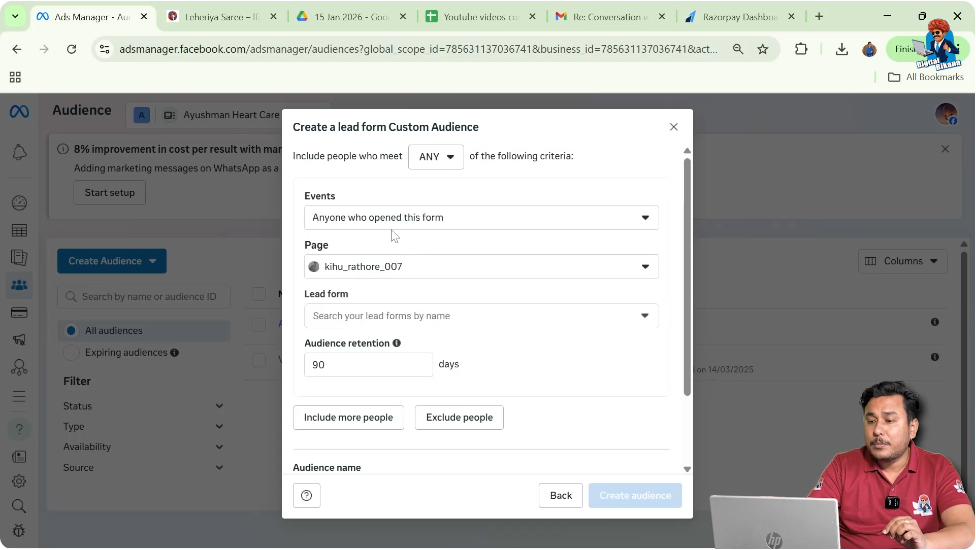
Event Option 1: Anyone Who Opened This Form
This option creates a custom audience of users who clicked on the lead form CTA button and opened the form.
How This Event Works
For example, suppose you ran a lead generation ad campaign earlier and attached a lead form to that campaign. The ad was shown to one lakh users.
Out of those users:
- Around 1,500 users clicked on the CTA button
- The lead form opened in front of them
Some users filled the form, and some users exited without submitting it.
Who Gets Included in This Audience
When you select Anyone who opened this form, the custom audience includes:
- Users who opened the form
- Users who did not submit the form
- Users who exited the form
This creates a large retargeting audience.
Why Users Do Not Submit Forms
Many users open the form but do not submit it because:
- The form feels too lengthy
- They are not comfortable filling forms
- They lose interest midway
These users are still valuable because they showed interest by opening the form.
Use Case of This Audience
You can retarget these users by showing them ads again and encouraging them to complete the process and convert.
Event Option 2: People Who Opened but Did Not Submit the Form
This event focuses specifically on users who opened the form but exited without submitting it.
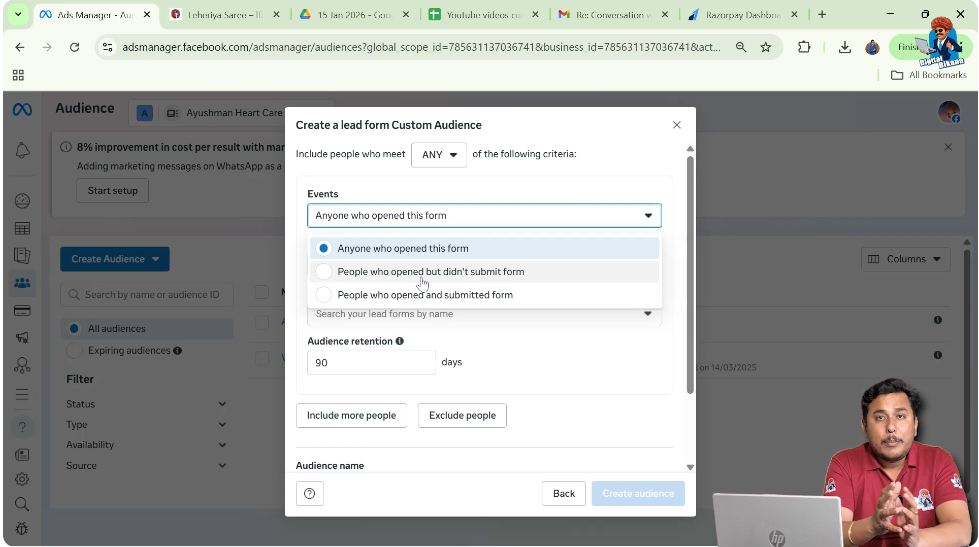
Why This Audience Is Important
These users are highly important because:
- They clicked the CTA button
- They showed interest
- They dropped off before conversion
By creating a custom audience of these users, you can retarget them with better messaging and get them converted.
Retargeting Strategy for This Audience
You can show retargeting ads to these users explaining benefits clearly or addressing their concerns. This helps bring them back and increase conversions.
Event Option 3: People Who Opened and Submitted the Form
This option creates a custom audience of users who opened the form and submitted it successfully.
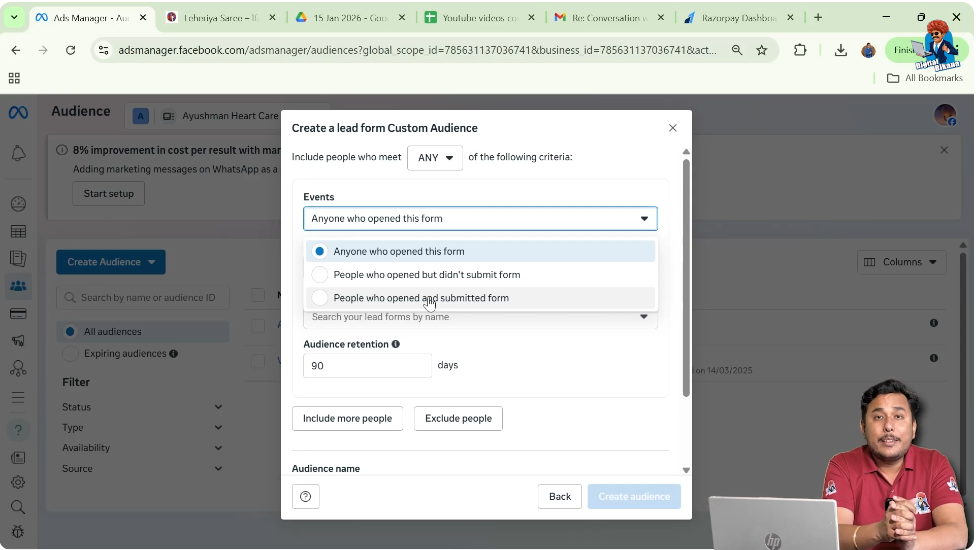
Why Create Audience of Submitted Leads
Many people ask why we need to create a custom audience of users who have already submitted the form since their data is already available.
The reason is simple: submitting a form does not guarantee conversion.
Understanding This With an Example
Continuing the earlier example:
- 1,500 users opened the form
- 500 users submitted the form
Out of these 500 users:
- Only 30 users converted
- Remaining users did not convert
However, these users were interested in your product or service, which is why they filled the form.
How This Audience Helps
You can retarget these users again by:
- Showing ads multiple times
- Reinforcing brand trust
- Improving brand recall
This increases the chances of conversion.
Additional Retargeting Methods
Apart from retargeting ads, these users can also be contacted through:
- Calls
- Messages
- Email marketing
- SMS marketing
- WhatsApp marketing
Retargeting ads support all these efforts by keeping your brand visible.
Choosing the Best Event Option
Among all three options, selecting Anyone who opened this form is often preferred.
Why This Option Is Preferred
When you choose Anyone who opened this form:
- Users who submitted the form are included
- Users who did not submit the form are included
This creates a combined and larger custom audience, making retargeting more effective.
Selecting Facebook Page and Lead Form
Step 4: Select the Facebook Page
Choose the Correct Page
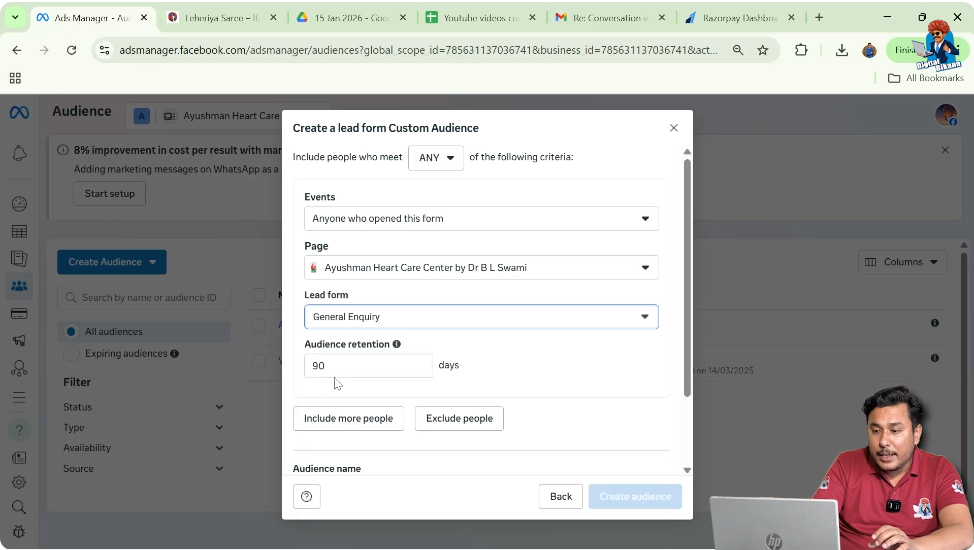
After selecting the event type, you need to select the Facebook page associated with your lead forms.
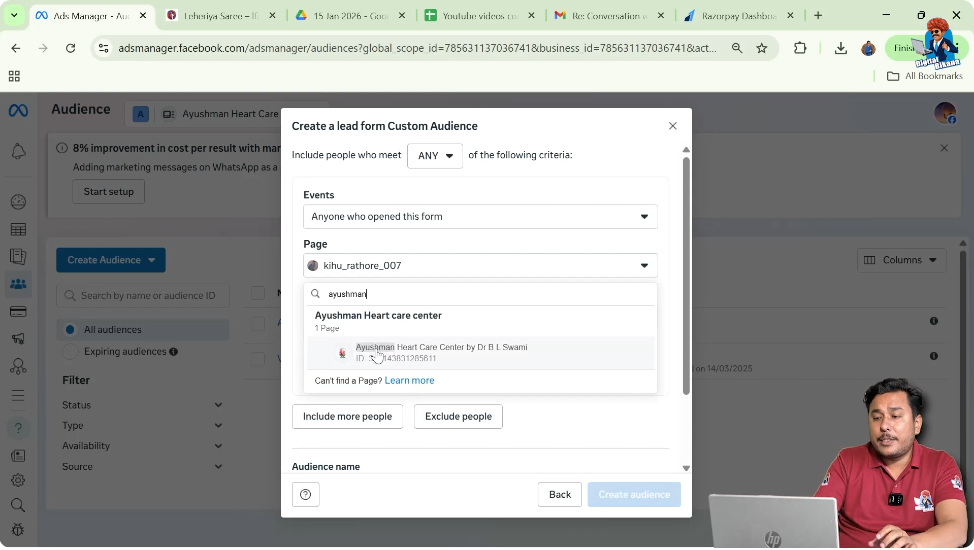
Step 5: Select the Lead Form
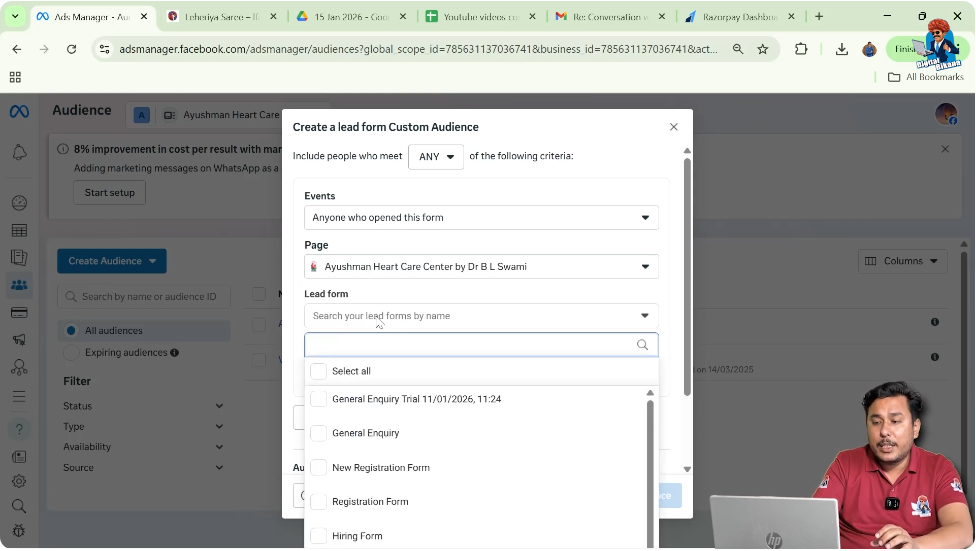
Choose One or Multiple Forms
Now select the specific lead form you want to use. You can select:
- One lead form
- Multiple lead forms
This depends on how many lead forms you have used in your campaigns.
Setting Audience Retention Duration
Step 6: Set Retention Period
Retain Users for 30 Days
Next, set the audience retention duration. In this case, the retention is set to 30 days.
This means:
- Users from the past 30 days remain in the audience
- Users older than 30 days are automatically removed
- New users keep getting added
How Retention Works Automatically
If your previous ad campaigns are still running:
- New users will keep joining the custom audience
- Old users will keep leaving after 30 days
This keeps your audience fresh and relevant.
Naming and Creating the Custom Audience
Step 7: Enter Audience Name
Use a Reference Name
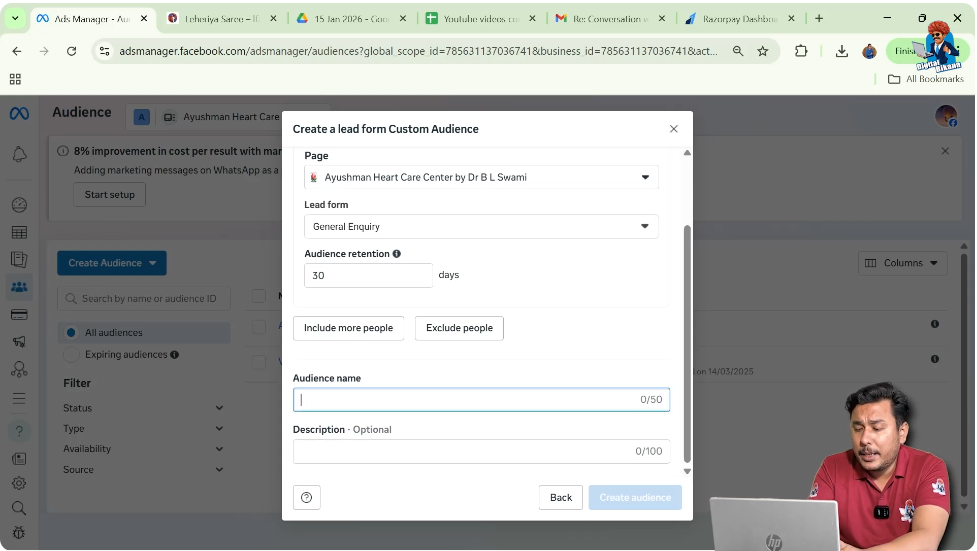
Enter an audience name such as Lead Trial. This name is only for your internal reference.
Step 8: Add Description and Create Audience
Finalize the Audience
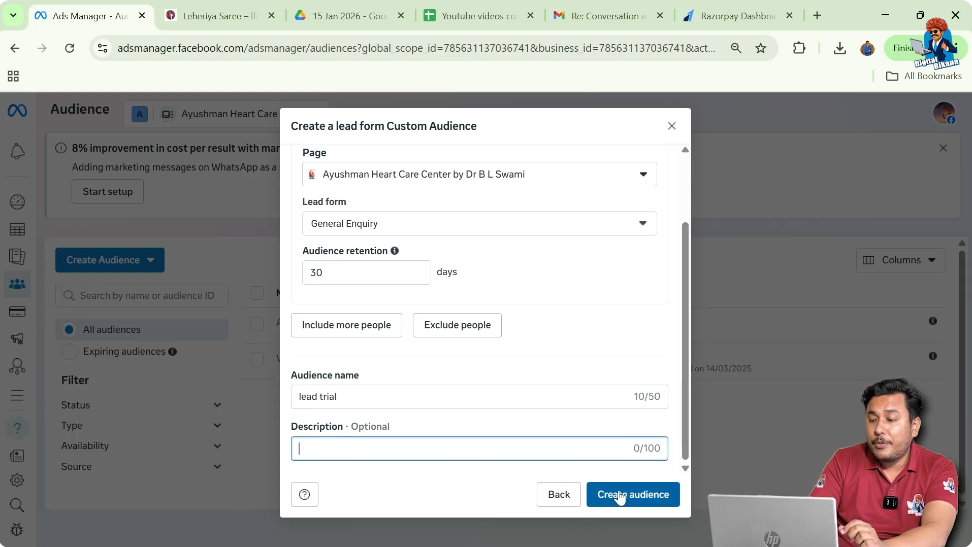
You can add a description for reference and then click on Create Audience.
Custom Audience Creation Status
After clicking create:
- The custom audience is created
- It appears in populating mode
- It becomes ready after data is processed
Once ready, you can use it in your ad campaigns.
Using Lead Form Custom Audience for Retargeting
Once the custom audience is ready, you can:
- Create retargeting ad campaigns
- Show ads multiple times per day
- Improve brand positioning
- Increase conversion chances
Showing ads two to three times a day helps users remember and trust your brand.
Benefits of Lead Form Custom Audience
Creating a custom audience of lead forms helps you:
- Retarget interested users
- Reduce wasted ad spend
- Increase conversion rate
- Improve campaign efficiency
Lead Form Custom Audience Explained in Simple Words
In simple words:
- People open your lead form
- Some submit, some exit
- You create an audience of these users
- You show them ads again
- They get convinced and convert
Final Conclusion
Creating a custom audience of lead forms in Facebook Ads Manager is a powerful retargeting strategy. It allows you to target users who have already shown interest by opening or submitting your lead form.
By selecting the right event option, setting proper retention, and using this audience for retargeting ads, you can significantly improve conversions. Among all options, choosing anyone who opened the form creates a broader and more effective audience.
Once created, the custom audience automatically updates, adding new users and removing old ones. This makes it a reliable and long-term asset for Facebook advertising success.

Related Posts