Hello friends, in this article we are going to learn what demographic-based targeting is in Meta Ads Manager and how it works in detail. Demographic targeting is one of the most important audience-selection methods in Meta advertising, especially when you want your ads to reach the right people based on their background, life stage, and personal attributes.
When you understand demographic-based targeting properly, you can show your ads to people who are more likely to be interested in your product or service, which helps you achieve better results with a controlled ad budget.
Understanding Where Demographic Targeting Exists in Meta Ads
Whenever you create a new campaign in Meta Ads Manager, the campaign structure is divided into three levels:
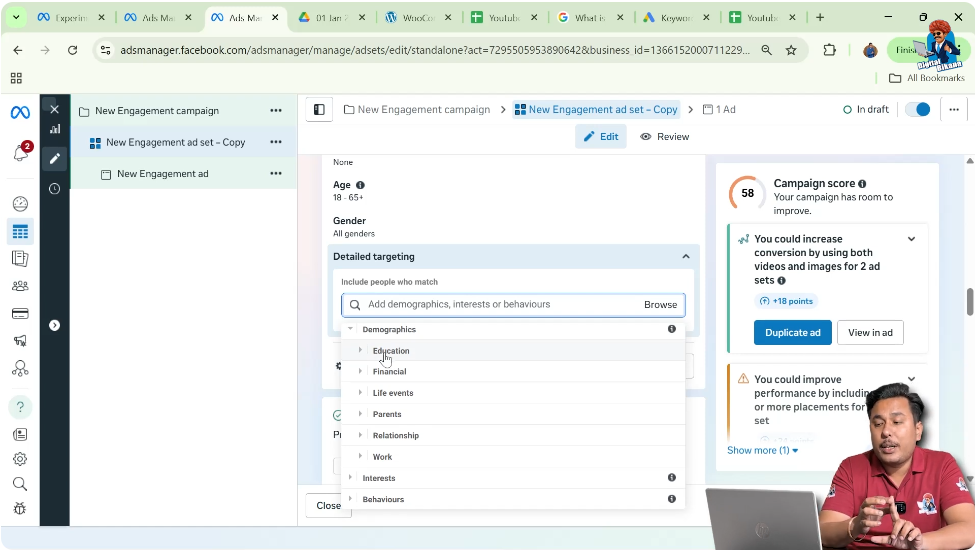
Demographic-based targeting is applied at the Ad Set level. After choosing your campaign objective and moving to the ad set level, you will see an option called Suggesting an Audience. This is the section where you can do Detailed Targeting.
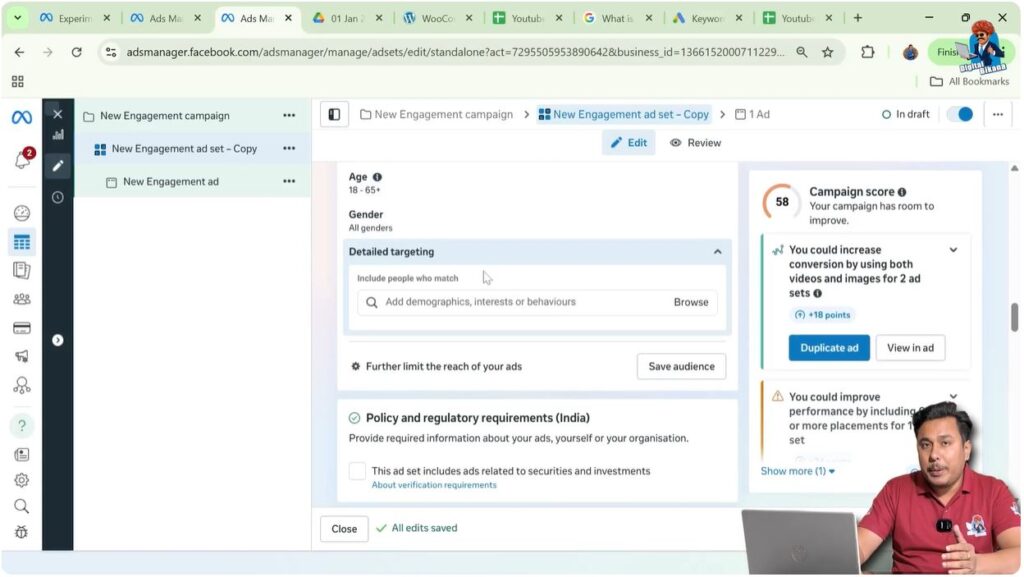
Exploring Detailed Targeting Options
When you click on the Browse button inside detailed targeting, Meta provides three main targeting categories:
Each of these categories works differently. In this article, the main focus is Demographic-based targeting, which helps advertisers target users based on factual and life-stage information.
What Is Demographic-Based Targeting?
Demographic-based targeting allows you to reach people based on characteristics such as:
- Education level
- Financial situation
- Life events
- Parenting status
- Relationship status
- Work and industry
If your goal is to ensure that your ad reaches a specific type of audience, demographic targeting can be extremely effective.
It is important to note that demographic targeting is optional. It is not mandatory to select demographic filters. You can also choose interest-based or behavior-based targeting if that suits your campaign goals better.

Education-Based Demographic Targeting
Let us first explore Education, which is one of the most widely used demographic filters.
When you click on education, several sub-filters become available.
Education Level Targeting
You can target people based on their current or completed education level, such as:
- School or high school students
- College or university students
- Graduates
- Post-graduates
This is especially useful if you are running:
- Coaching institutes
- Colleges or universities
- Online courses
- Skill-based training programs
By selecting the appropriate education level, your ads are shown to people who are more relevant to your offering.

Field of Study Targeting
Apart from education level, Meta also allows you to target people based on their field of study.
For example:
- Bachelor of Commerce
- Bachelor of Technology
- Master of Business Administration
If your service or product is specific to a particular academic stream, field-of-study targeting helps you reach a highly relevant audience.

University and Institution Targeting
You can also target users based on the name of their university or institution. This can be useful for:
- University-specific programs
- Campus events
- Student-focused services
This level of targeting helps in reaching a very precise audience.

Financial Demographic Targeting
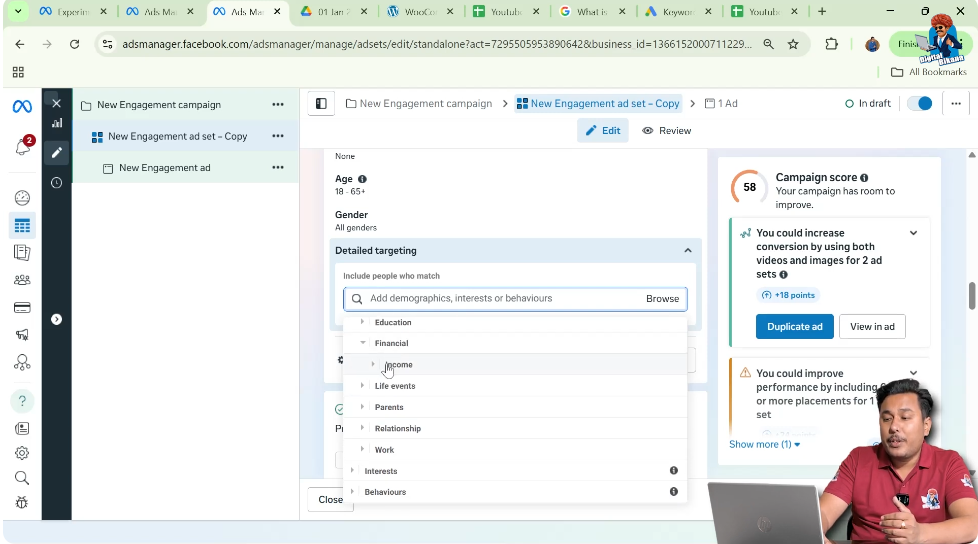
Next comes Financial targeting, which focuses mainly on household income.
Meta provides income-based filters such as:
- Top 10% household income
- Top 10% to 25%
- Top 25% to 50%
This option is helpful for businesses that sell:
- Premium products
- Luxury goods
- High-value services
By targeting people based on income range, advertisers can align their ads with the purchasing capacity of their audience.
Life Events Targeting Explained
One of the most powerful demographic tools in Meta Ads Manager is Life Events targeting. This option allows you to reach people during important moments in their lives.
Anniversary-Based Targeting
You can target people who have an anniversary within the next 30 days. This is especially useful for:
- Cake shops
- Gift shops
- Jewelry shops
These businesses benefit greatly by promoting offers at the right time.

Living Away From Family
If you are running a tiffin service center, you can target people who are living away from their family. Such people are more likely to look for food and meal services.

Birthday and Month-of-Birth Targeting
You can also target people based on their month of birth. This is useful for:
- Cake shops
- Restaurants
- Cafes
Birthday-related targeting allows you to promote offers exactly when people are more likely to celebrate.
Friends of People With Upcoming Birthdays
If you are running a cake shop, you can target:
- Friends of people who have a birthday in 0–7 days
- Friends of people who have a birthday in 7–30 days
This helps capture last-minute gift and cake buyers.

Relationship and Career Life Events
Meta also allows targeting based on life changes such as:
- Long-distance relationships
- New job
- New relationship
If you run a wedding photography business, you can target people who are newly engaged. Similarly, catering businesses and marriage lawn businesses can also target these users.

Honeymoon and Travel-Related Life Events
If you are running a travel agency and want to sell honeymoon packages, you can target people who are newly wedded. These users are more likely to be interested in travel and honeymoon offers.
Parents-Based Demographic Targeting
The Parents category is extremely useful for child-focused businesses.
You can target:
- Parents with children up to 12 months
- Parents of teens
For example:
- A diaper manufacturing company can target parents of infants
- Day boarding or child-care services can target parents of teens
This allows businesses to promote highly relevant products to the right stage of parenthood.

Relationship Status Targeting
Under demographic targeting, Meta also provides Relationship Status filters.
If you are running a matrimonial agency, you can target people based on whether they are:
- Single
- In a relationship
- Engaged
- Married
This helps relationship-based businesses connect with people who are actively looking for such services.

Work and Industry-Based Targeting
The final major demographic category is Work.
Here, you can target people based on:
- The industry they work in
- The type of company they work for
For example, you can target people working in:
- Cleaning and maintenance services
- Specific industries or sectors
This is particularly useful for B2B businesses and service providers targeting professionals from certain industries.

Is Demographic Targeting Mandatory?
It is important to understand that demographic-based targeting is not mandatory.
If you do not feel the need to target people based on demographics, you can:
- Skip demographic filters
- Use interest-based targeting
- Use behavior-based targeting
Meta Ads Manager gives full flexibility to advertisers to choose the targeting method that best suits their campaign goals.
Final Understanding of Demographic-Based Targeting
Demographic-based targeting in Meta Ads Manager helps advertisers reach people based on education, income, life events, parenting status, relationship status, and work profile.
By using these filters correctly, advertisers can:
- Show ads to more relevant audiences
- Improve ad performance
- Reduce wasted ad spend
- Achieve better results with controlled budgets
Demographic targeting is a powerful option, but it should be used only when it aligns with your business and campaign objectives.

Related Posts