Creating a custom audience of people who like or follow your Facebook page is one of the simplest and most effective retargeting strategies in Facebook Ads Manager. These users have already shown interest in your brand by liking or following your page.
By creating a custom audience of these users, you can:
- Retarget them with special offers
- Promote new products or services
- Increase engagement
- Improve conversions
In this article, we will clearly explain how to create a custom audience of people who currently like or follow your Facebook page.
Why Target People Who Like Your Facebook Page?
People who like or follow your Facebook page are already familiar with your brand. This makes them a warm audience.
Targeting this group can help you:
- Build stronger brand relationships
- Increase repeat engagement
- Drive conversions more effectively
- Improve return on ad spend
Since these users have already interacted with your page, they are more likely to respond positively to your ads.
Where to Create This Audience in Ads Manager
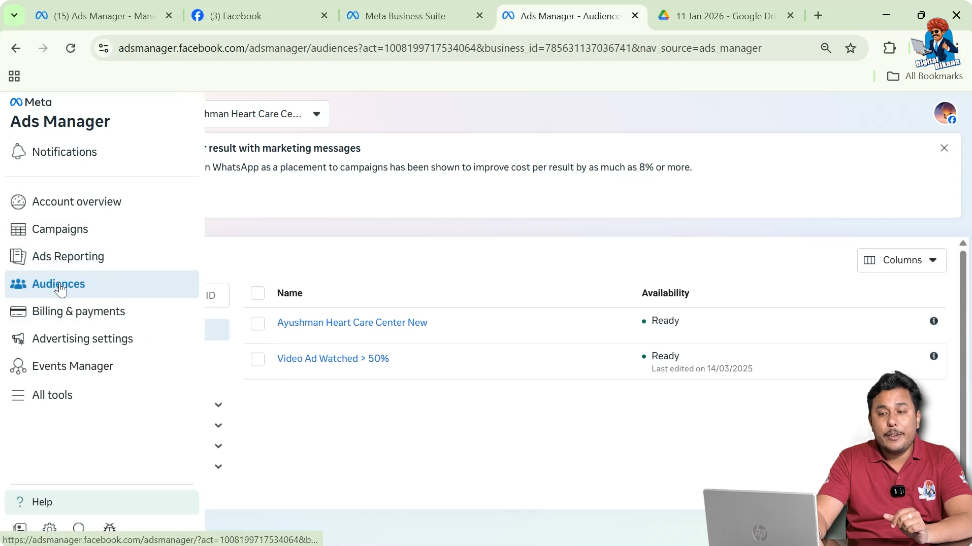
To create this custom audience, you need to go to Facebook Ads Manager and navigate to the Audiences section.
The custom audience is created from the Facebook Page source.
How to Create a Custom Audience of People Who Like Your Facebook Page?
Step 1: Go to the Audiences Section
Open Facebook Ads Manager
- Log in to Facebook Ads Manager.
- Navigate to the Audiences section.
- Click on Create Audience.
- Select Custom Audience.
This will open the source selection window.
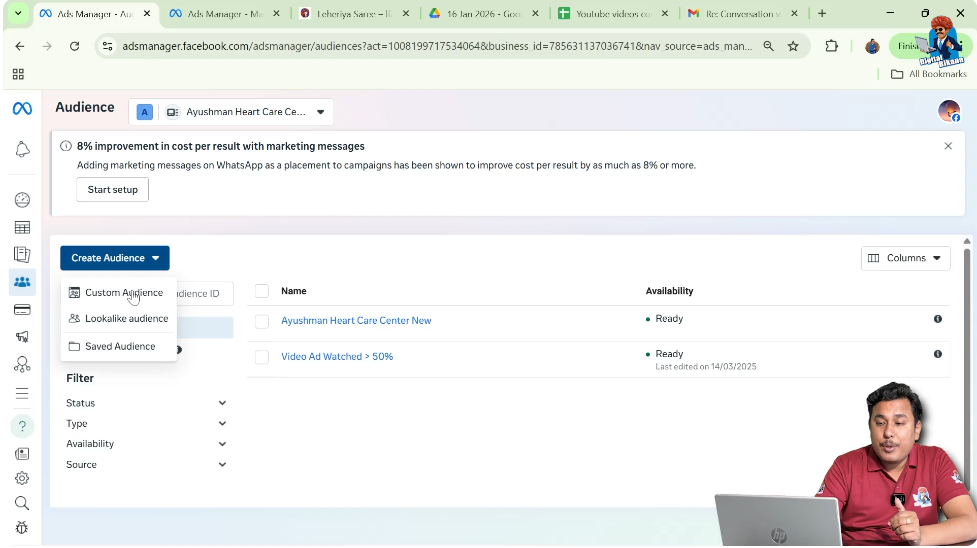
Step 2: Select Facebook Page as the Source
Choose the Facebook Page Option
- From the available sources, select Facebook Page.
- Click Next.
This ensures that the audience will be created using Facebook page data.

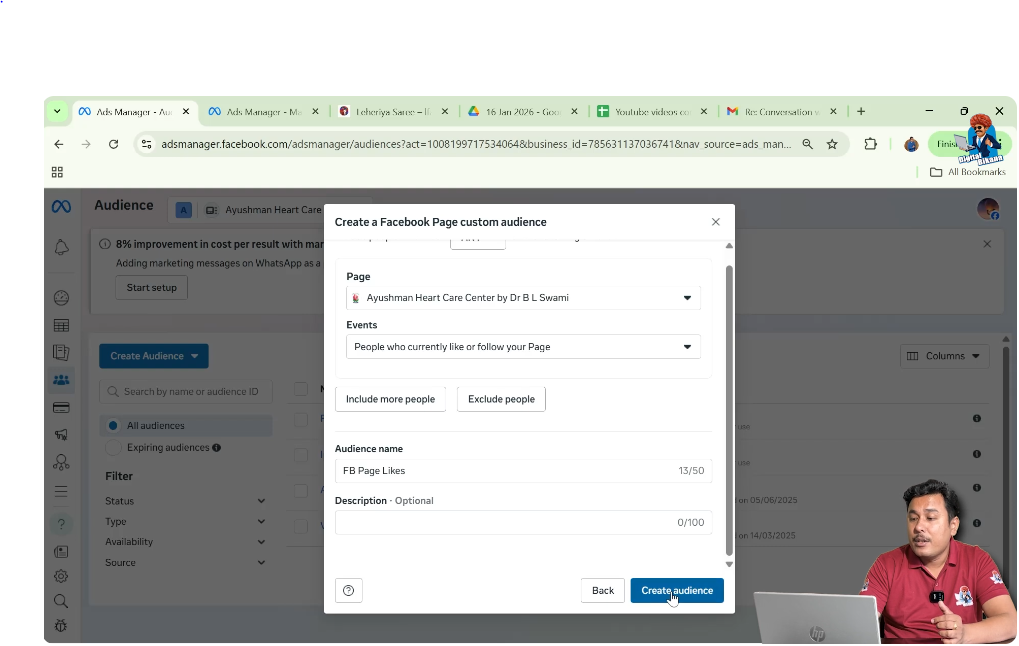
Step 3: Select Your Facebook Page
Choose the Correct Page
- From the dropdown menu, select the Facebook page for which you want to create the custom audience.
- Confirm the page selection.
Make sure you choose the correct page before proceeding.
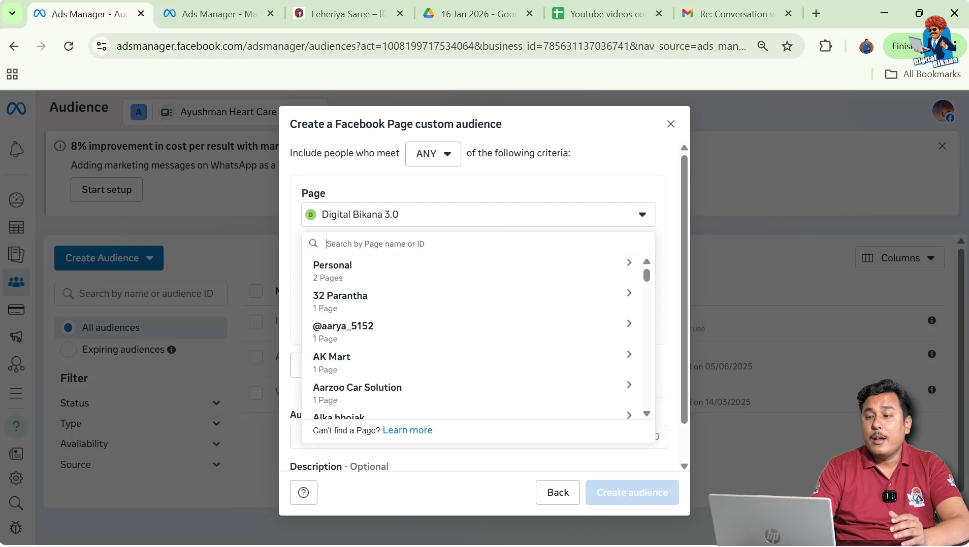

Step 4: Select the Event “People Who Currently Like or Follow Your Page”
Choose the Appropriate Event
In the events section:
- Select People who currently like or follow your page.
This event ensures that the custom audience will include:
- Users who have liked your Facebook page
- Users who follow your Facebook page
This is different from engagement-based audiences, which include users who interacted with posts or ads.
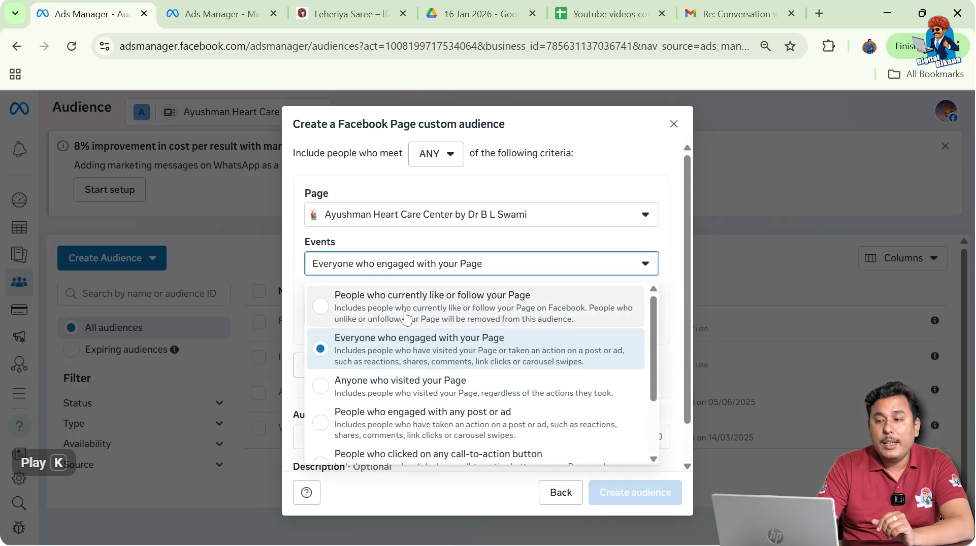
Understanding Other Available Events
Facebook also provides other engagement events, such as:
- People who engaged with your page
- People who engaged with any post or ad
Step 5: Enter the Audience Name
Name Your Custom Audience
After selecting the event:
- Enter a suitable name for your custom audience.
- The name is only for your internal reference.
For example:
- Page Likes Audience
- Facebook Page Followers
This name will not be visible to users. It is only for managing your audiences inside Ads Manager.
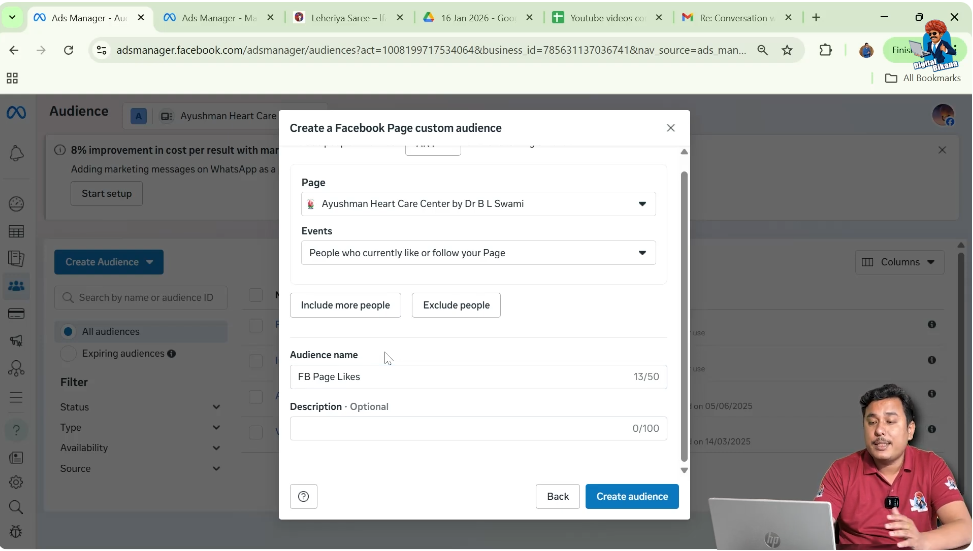
Step 6: Click on Create Audience
Finalize Audience Creation
- Click on Create Audience.
Once clicked:
- The custom audience will be created.
- It will appear in the Audiences section.
Audience Populating Phase
After creation, the audience may show as:
Populating
This means Facebook is collecting and processing the data.
The audience typically becomes ready within:
6 to 24 hours
Once the populating phase is complete, you can use the audience in your ad campaign.
How This Audience Works
This custom audience includes:
- Users who currently like your page
- Users who follow your page
If someone unlikes or unfollows your page, they may eventually be removed from the audience.
The audience updates dynamically based on current page likes and follows.
When Should You Use This Audience?
You should use this audience when:
- Promoting new offers
- Launching new products
- Running retargeting campaigns
- Building loyalty campaigns
Since these users already follow you, they are more likely to engage again.
Difference Between Page Likes Audience and Engagement Audience
It is important to understand the difference:
Page Likes Audience
Includes only users who like or follow your page.
Engagement Audience
Includes users who interacted with posts, ads, reactions, comments, or shares.
Both are useful but serve different retargeting strategies.
Benefits of Targeting Page Likes
Targeting page likes:
- Improves ad relevance
- Reduces cold targeting
- Increases engagement rates
- Strengthens brand loyalty
It is one of the easiest custom audiences to create.
Final Summary
To create a custom audience of people who like your Facebook page:
- Go to Audiences section.
- Click Create Audience.
- Select Custom Audience.
- Choose Facebook Page as source.
- Select your page.
- Choose “People who currently like or follow your page.”
- Enter audience name.
- Click Create Audience.
Wait 6–24 hours for the audience to populate.
Conclusion
Creating a custom audience of people who like or follow your Facebook page is a simple and effective strategy inside Facebook Ads Manager. Since these users have already shown interest in your page, they form a strong warm audience for retargeting.
By selecting Facebook Page as the source, choosing the event “People who currently like or follow your page,” and completing the setup process, you can build a ready-to-use custom audience within minutes.
Once the audience completes the populating phase, you can use it in your ad campaigns to reach users who already know and trust your brand.

Related Posts