In this article, you will learn how to buy an SSL certificate for your domain name from GoDaddy step by step. An SSL certificate is important for making your website secure and protecting the data that is transferred between your website and users.
An SSL certificate protects your website data through encryption. It secures the information that travels from your website to users and from users back to your website. If you want to make your website a safe and secure place and also want to rank on Google search engine result pages, then you would require an SSL certificate.
This guide explains the complete process of purchasing an SSL certificate from GoDaddy.
What is SSL Certificate?
An SSL certificate is a security feature that protects the data transferred between a website and its users.
When users visit a website, information such as login details, contact form data, and other personal information may be exchanged. SSL certificate encrypts this data so that it cannot be accessed by unauthorized users.
SSL certificate makes your website secure and trustworthy for visitors.
It protects the data that is transferred from your website to users and from users to your website through encryption.
If you want to make your website more secure and want better visibility on Google search engine result pages, then installing an SSL certificate is important.
Opening GoDaddy Website
1. Sign in to GoDaddy Account
First, open your web browser and search for GoDaddy on Google. Open the first website and sign in to your GoDaddy account.
After signing in, you will land on the GoDaddy homepage where you can access different services including SSL certificates.

Navigating to SSL Certificates
2. Go to Security Section
On the GoDaddy homepage, you will see a header section containing different menu options.
In the header menu, there is an option called Security.
Click on the Security option and then select SSL Certificates.
After clicking on SSL Certificates, you will see multiple SSL certificate plans available.

Types of SSL Certificates
When you open the SSL certificates page, you will see different SSL certificate options.
These SSL certificates are designed for different requirements and budgets.
You can choose the SSL certificate according to your website requirement.

Single Domain DV SSL Certificate
Features and Pricing
If you want to purchase a single domain DV SSL certificate, it may cost around ₹3,228 per year.
This SSL certificate works for a single domain only.
With this SSL certificate, you need to install the SSL certificate manually.
This is a do-it-yourself option where GoDaddy does not help with installation.
You need to install the SSL certificate on your domain by yourself.
SSL Certificate with GoDaddy Management
Installation and Maintenance Support
There is another SSL certificate option where GoDaddy handles installation, reinstallation, troubleshooting, and maintenance.
In this option, GoDaddy manages the SSL certificate for you.
You do not need to worry about installing or maintaining the SSL certificate.
This option is useful for users who do not want to install SSL certificates manually.
SSL Certificate for Multiple Websites
SSL for Multiple Domains
If you have multiple websites and want to purchase SSL certificates for multiple domains, you can choose a plan that supports multiple websites.
Some SSL certificates work for five websites.
This means you can secure five domains using one SSL certificate plan.
This option is useful for users who manage multiple websites.
SSL Certificate for One Website with Subdomains
Unlimited Subdomains
Some SSL certificate plans work for one website but support unlimited subdomains.
This means you can secure one main domain and all its subdomains using a single SSL certificate.
This option is suitable when you have only one main website with multiple subdomains.
Selecting SSL Certificate
3. Choose SSL Certificate Plan
After comparing the SSL certificate plans, you can choose the SSL certificate according to your requirement.
For one website, a single SSL certificate plan is a suitable option.
You can select the SSL certificate and add it to your cart.

Adding SSL Certificate to Cart
4. Add SSL Certificate to Cart
After selecting the SSL certificate, click on Add to Cart.
Once added, you can proceed with the purchase process.

Choosing Purchase Duration
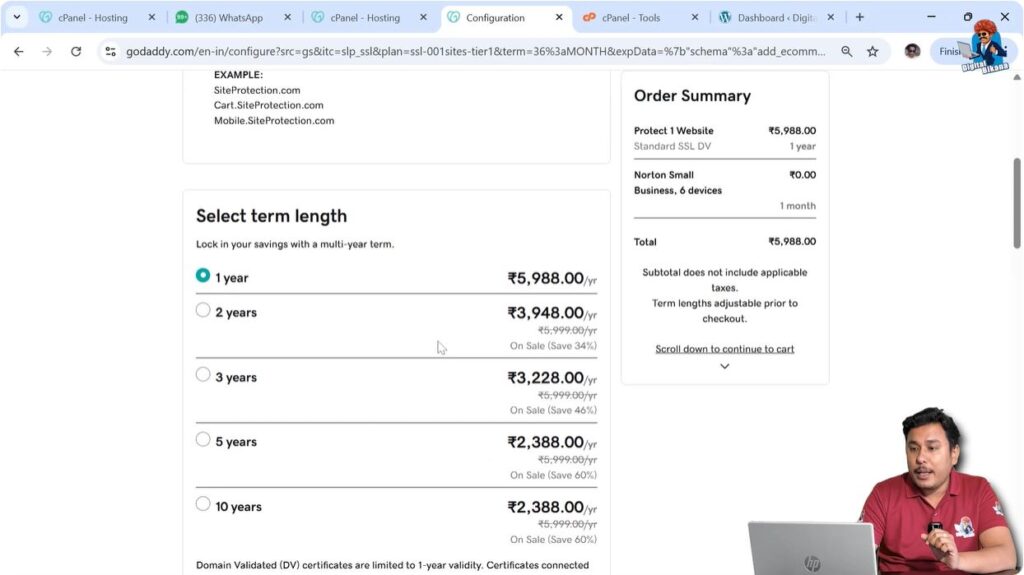
5. Select SSL Certificate Duration
You can select the duration for the SSL certificate.
For example, you can select one year.
After selecting the duration, you can proceed with the purchase.
Payment Process
6. Complete Payment
After selecting the SSL certificate and duration, you need to make the payment.
Once the payment is completed, the SSL certificate will be purchased successfully.
The SSL certificate will then appear in your GoDaddy products page.

Installing SSL Certificate
Manual Installation
After purchasing the SSL certificate, you need to install it on your domain name.
If you have selected the manual SSL certificate option, you need to install the SSL certificate yourself.
GoDaddy does not handle installation in the do-it-yourself SSL certificate option.
You must install the SSL certificate manually on your domain name after purchase.
Conclusion
Buying an SSL certificate from GoDaddy is a simple process. You need to sign in to your GoDaddy account, go to the Security section, select SSL certificates, choose a suitable plan, and complete the payment.
SSL certificates protect your website data through encryption and make your website secure for users.
After purchasing the SSL certificate, it will be available in your GoDaddy products page and you can install it on your domain name.
Installing an SSL certificate helps make your website safer and more secure for visitors.

Related Posts