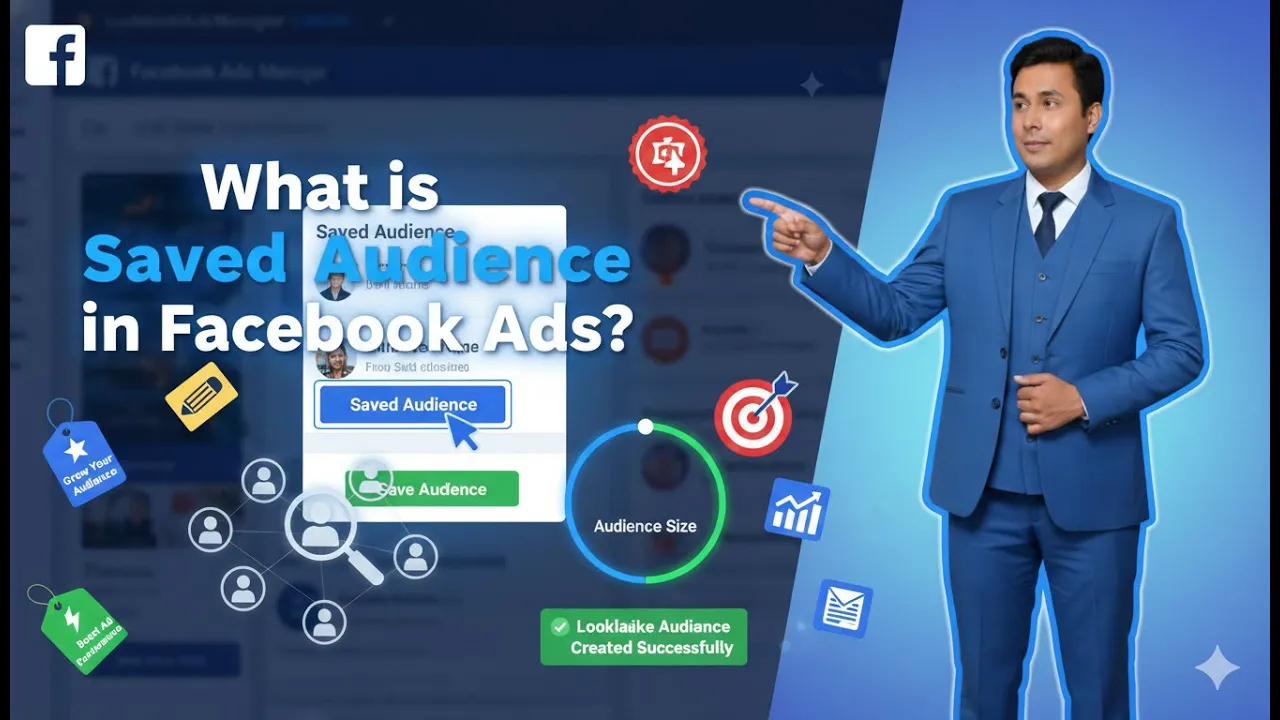
Hello friends, in this article we are going to understand what a saved audience is in Facebook ads in detail. While running Facebook ad campaigns, audience selection plays a very important role. Inside Ads Manager, Meta provides different audience options that advertisers can use to target people. One of these audience types is called a saved audience. This article explains what a saved audience is, where it is available inside Ads Manager, how Meta creates saved audiences, and how advertisers can use them while running ad campaigns.
Where to Find Saved Audience in Ads Manager
Step 1: Enter Meta Ads Manager
To understand saved audiences, the first step is entering Meta Ads Manager.
Once you are inside Ads Manager, you will see different options available in the interface.

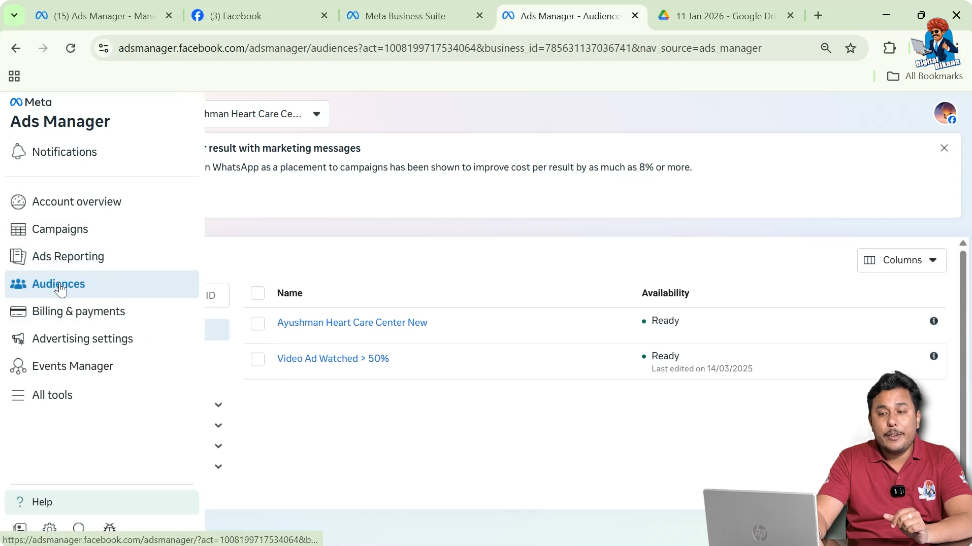
Step 2: Go to the Audiences Section
On the left-side toolbar of Ads Manager, there is an option called Audiences.
When you click on the Audiences option, a new page opens where all audience-related settings are available.
Step 3: Click on Create a New Audience
On the Audiences page, there is an option to create a new audience.
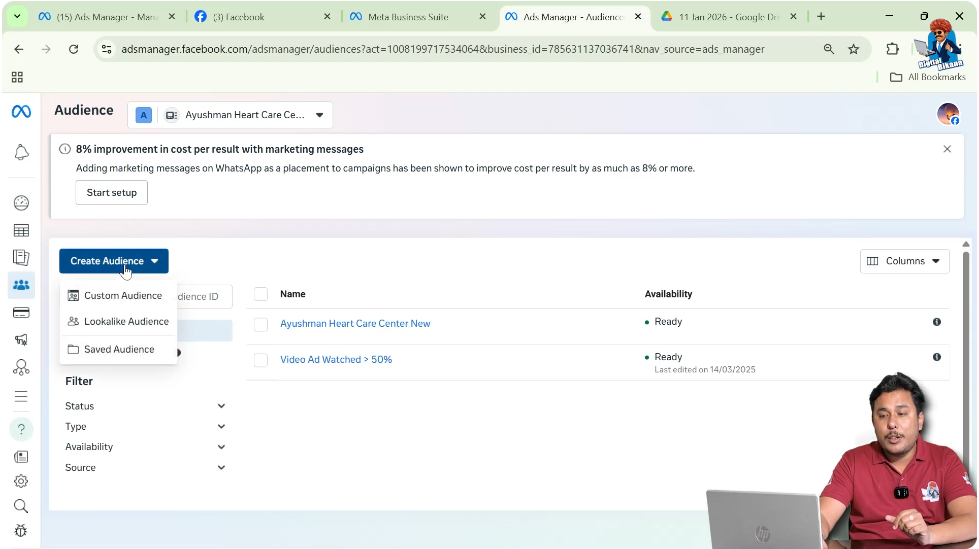
Whenever you click on this option, Meta shows three different types of audiences that can be created for ad campaigns.
Types of Audiences in Facebook Ads
When you click on the option to create a new audience, Meta provides three audience types:
1. Custom Audience
2. Lookalike Audience
3. Saved Audience
In this article, we are focusing only on the saved audience and understanding what it means and how it works.
What Is a Saved Audience?
A saved audience is an audience that is already created and saved by Meta for advertisers.
Meta has already created many audience buckets based on different criteria such as:
These audiences are stored inside Ads Manager so that advertisers can directly use them while running their ad campaigns.
Saved Audience as a Ready-Made Audience
Saved audience can be understood as a ready-made audience.
Advertisers do not need to manually build these audiences from scratch. Meta has already prepared these audiences in advance so that advertisers can directly select them and run ads.
This makes the saved audience a convenient option for advertisers.
Saved Audience and Advertisers
Saved audiences are kept by Meta specifically for advertisers.
The purpose of these saved audiences is to allow advertisers to:
- Quickly select an audience
- Target specific groups of people
- Run ad campaigns without creating audiences manually
Advertisers can directly target these saved audiences while setting up their campaigns.
Saved Audience and Detailed Targeting
Saved audiences are available in the form of detailed targeting filters.
These filters are part of the detailed targeting section inside Ads Manager.
Whenever advertisers select options under detailed targeting, they are actually using saved audiences created by Meta.
Basis of Saved Audience Creation
Saved audiences are created by Meta based on three major factors:
Demographics
Interests
Behavior
Meta combines these factors to create multiple audience buckets that advertisers can use.
How Meta Creates Saved Audiences
Now the important question is how Meta creates these saved audiences.
Meta creates saved audiences based on the information users provide while creating their Facebook or Instagram accounts.
Information Collected by Meta
Meta collects various types of information from users, such as:
Account Information
- Where users study
- What they study
- Where they work
- Relationship status
Personal Preferences
- What users like
- What kind of content they interact with
Content Consumption Behavior
Meta also observes how users behave on its platforms.
For example:
- What kind of posts users watch
- What kind of reels users watch
- What type of content they engage with
User Interaction Signals
Meta tracks user interactions such as:
- Comments users make
- Content users engage with
- Topics users show interest in
All these signals help Meta understand user behavior.
Creation of Audience Buckets
Based on all this information, Meta creates multiple audience buckets.
These buckets group users who share similar characteristics, interests, demographics, or behaviors.
These buckets are what we call saved audiences.
Purpose of Saved Audience Buckets
The purpose of creating saved audience buckets is to allow advertisers to target a group of people with similar characteristics.
Instead of targeting individuals one by one, advertisers can target an entire group using saved audiences.
Targeting Options Available in Saved Audience
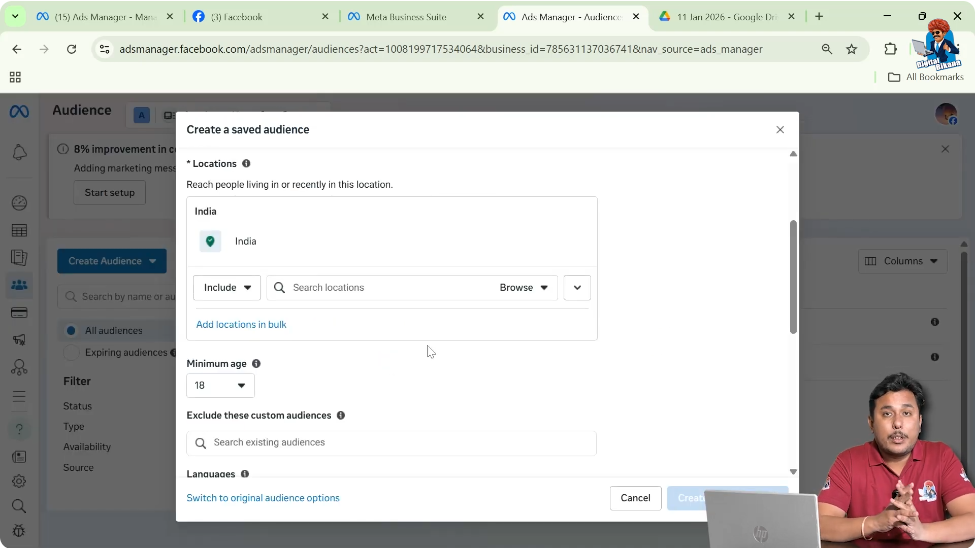
Using saved audiences, advertisers can target people based on several options.
Targeting by Location
Advertisers can target people based on the location where they live.
This allows advertisers to show ads only to people from specific locations.
Targeting by Age Group
Saved audiences allow advertisers to target people based on different age groups.
This helps advertisers reach people of a specific age range.
Targeting by Gender
Advertisers can also target people based on gender using saved audiences.
Targeting Using Detailed Targeting Filters
Detailed targeting allows advertisers to target people based on:
- Demographics
- Interests
- Behavior
All these options are part of saved audiences created by Meta.
Example of Saved Audience Usage
Let us understand saved audience with a simple example.
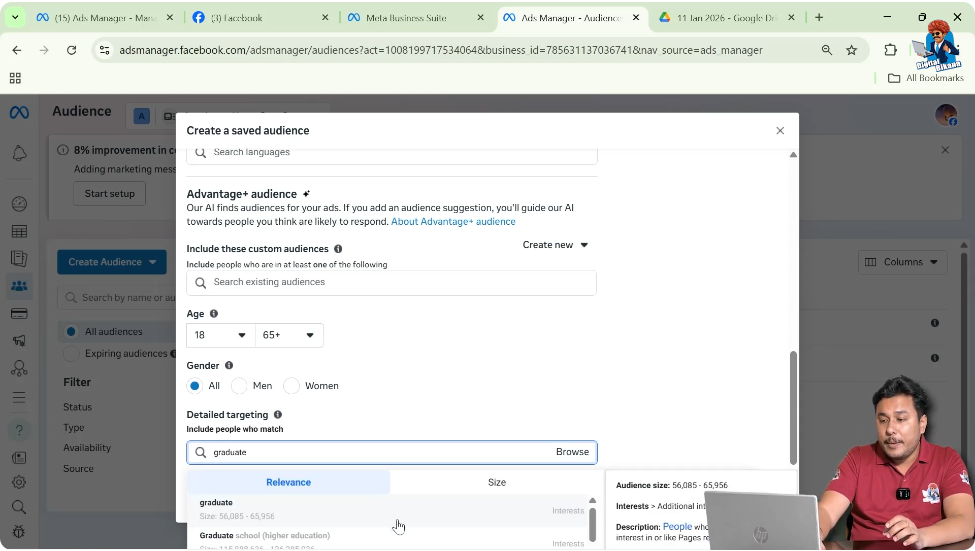
Suppose an advertiser wants to run an ad campaign and wants to show the ad only to university graduates.
Step 1: Enter Detailed Targeting
While setting up the ad campaign, the advertiser goes to the detailed targeting section.
Step 2: Search for Graduate
In the detailed targeting field, the advertiser types graduate.
Step 3: Select University Graduate
From the available options, the advertiser selects university graduate.
Who Created This Audience?
Now the important question is who created this audience of university graduates.
This audience is not created by the advertiser.
This audience is already created and saved by Meta.
Meta’s Role in Creating University Graduate Audience
Meta has already identified people who are university graduates based on the information they provided while creating their accounts.
Meta grouped these people together and saved them as a ready-made audience.
Advertisers can directly use this saved audience.
Saved Audience as Ready-Made Filter
Saved audience works like a ready-made filter.
Advertisers only need to apply the filter, and Meta automatically shows ads to people who match that filter.
There is no need to manually collect or create this audience.
Why Saved Audience Is Useful
Saved audiences make it easy for advertisers to:
- Target specific groups
- Save time during campaign setup
- Use Meta’s pre-created audience data
Advertisers can focus on running campaigns instead of building audiences manually.
Relationship Between Saved Audience and Advertisers
Saved audiences exist mainly to help advertisers run ads efficiently.
Meta has already done the work of collecting and organizing audience data.
Advertisers simply use this data while running campaigns.
Final Understanding of Saved Audience
Saved audience is an audience that Meta has already created and saved for advertisers.
It is a ready-made audience available in the form of detailed targeting filters based on:
Advertisers can directly use these saved audiences to target people while running ad campaigns.
Final Conclusion
Saved audience in Facebook ads refers to the audiences that Meta has already created and stored for advertisers.
These audiences are created based on user information, behavior, and interactions on Meta platforms.
Advertisers can directly use these ready-made audiences through detailed targeting options to run ad campaigns without creating audiences from scratch.

Related Posts