
Artificial Intelligence (AI) Automation is transforming how work gets done in today’s digital world. From simplifying repetitive tasks to handling complex workflows across multiple platforms, AI automation is becoming an essential part of modern businesses and daily operations. Instead of manually managing every process, AI automation allows systems to work intelligently, saving time, reducing errors, and improving efficiency.
At its core, AI automation combines artificial intelligence with workflow automation tools to perform tasks without continuous human involvement. These tasks can include data collection, processing, communication, and even decision-making based on predefined logic.
In recent times, discussions around AI tools have significantly increased. Whether it is conversational AI platforms or automation tools, the focus is shifting toward creating smarter systems that can operate independently. However, the real power of AI is not just in individual tools but in how different systems can be connected and automated into a seamless workflow.

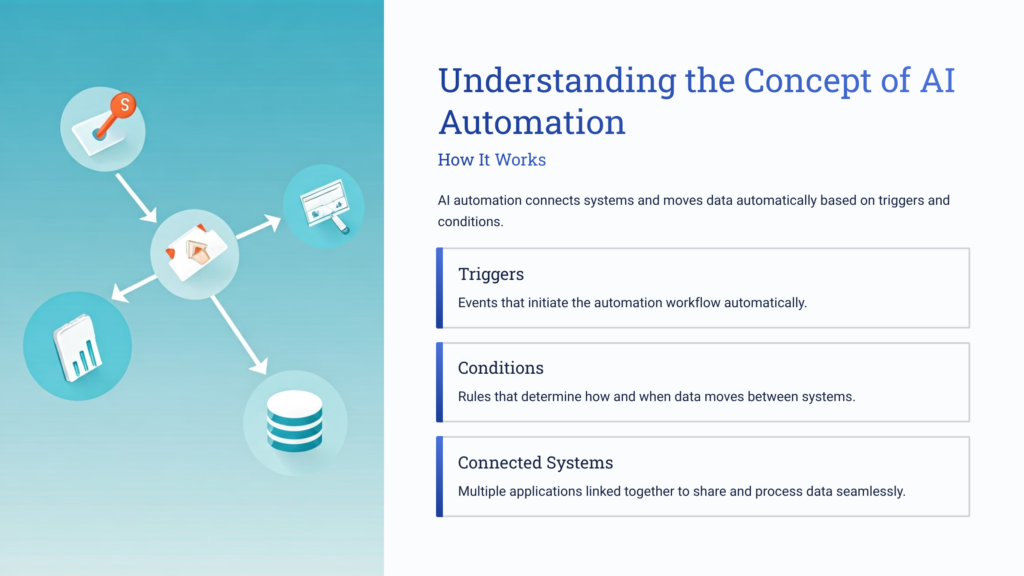
Understanding the Concept of AI Automation
AI automation is not just about using artificial intelligence; it is about designing systems that can execute multiple tasks automatically based on triggers and conditions. These systems are built using workflows that define how data moves from one platform to another.
A simple way to understand this is by looking at how different applications can communicate with each other. For example, when a user submits information in a form, that data can automatically be sent to a spreadsheet, trigger an email response, and get stored in a database—all without manual intervention.
This interconnected flow of tasks is what makes AI automation powerful. It reduces the need for human effort in repetitive operations and ensures consistency in execution.
The Role of Automation Tools
Automation tools play a crucial role in implementing AI automation. These platforms allow users to connect multiple applications and create workflows using simple drag-and-drop interfaces. Instead of writing complex code, users can visually design processes that automate their tasks.
These tools support integration with thousands of applications, making it possible to automate workflows across different systems. Whether it is data entry, communication, or database management, everything can be handled within a single automated flow.
One of the key advantages of such tools is their simplicity. Even though automation may sound complex, modern platforms are designed to be user-friendly. This makes it accessible to individuals who may not have a technical background.
What is a Scenario in AI Automation?
Definition of a Scenario
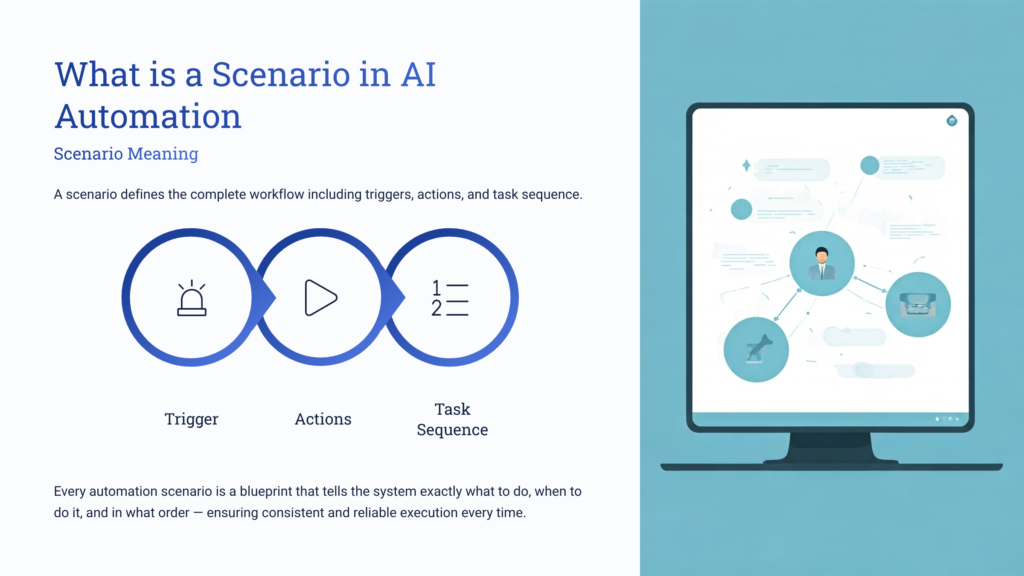
A scenario in AI automation refers to a complete workflow that defines what actions will be performed and in what sequence. It acts as a blueprint for automation, outlining how data flows and how tasks are executed.
In simple terms, a scenario answers the question: “What process is going to be automated?”
Importance of Scenarios
Scenarios are essential because they provide structure to automation. Without a clearly defined scenario, it becomes difficult to manage tasks or ensure that the workflow operates correctly.
A well-designed scenario ensures that:
- Tasks are executed in the correct order
- Data is transferred accurately between systems
- Automation runs smoothly without errors
How a Scenario Works
A scenario begins with a trigger, such as receiving data from a form. Once triggered, it performs a series of actions, such as storing data, sending notifications, or updating records.
Each step in the scenario is connected, forming a continuous flow. This allows multiple tasks to be completed automatically as soon as the initial trigger occurs.
Understanding Operations in Automation
Operations are the individual actions performed within a scenario. Every time a task is executed—such as adding data to a sheet or sending an email—it counts as one operation.
Why Operations Matter
Operations are important because they determine how much work an automation system is performing. The number of operations increases as more tasks are added to a workflow.
For example:
- Receiving data from a form is one operation
- Storing that data is another operation
- Sending an email is an additional operation
The total number of operations reflects the complexity and activity level of the automation.
Building an AI Automation Workflow
Creating an AI automation workflow involves connecting different tools and defining how they interact with each other. The process may seem complex at first, but it becomes easier when broken down into steps.
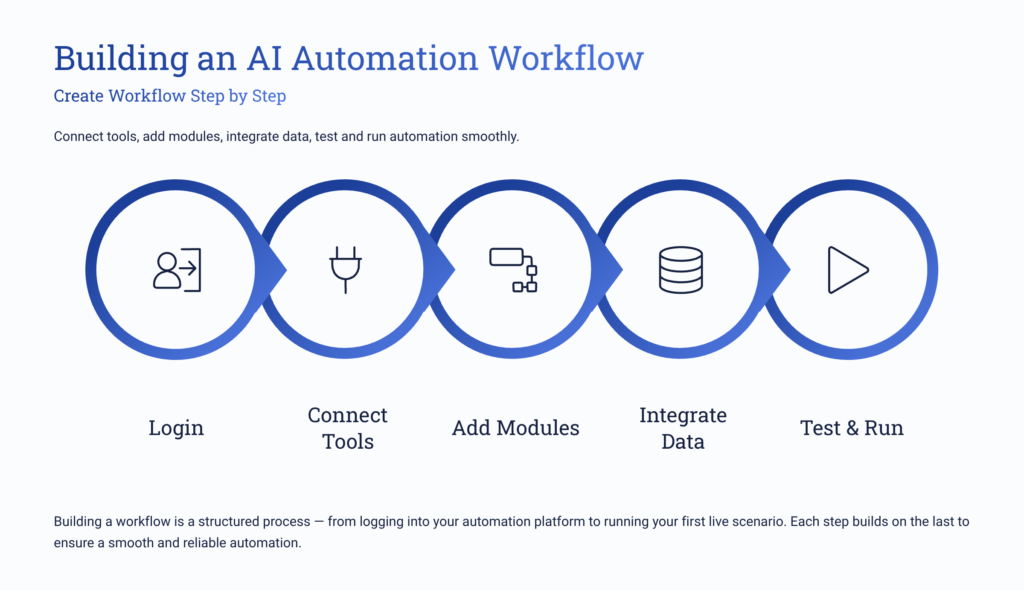
Step 1: Accessing the Automation Platform
The first step is to access an automation platform and create an account. Most platforms offer a free starting option, allowing users to explore features without initial investment.
Once logged in, users are presented with a dashboard where they can begin creating workflows.
Step 2: Creating a New Scenario
After accessing the dashboard, the next step is to create a new scenario. This is where the automation process begins.
The scenario acts as a canvas where different modules (tasks) are added and connected. It defines the entire workflow, including triggers and actions.
Step 3: Adding Modules
Modules are the building blocks of a scenario. Each module represents a specific task, such as retrieving data, sending emails, or updating records.
Users can add modules by selecting from a list of available applications or by searching for specific tools. These modules are then connected to form a workflow.
Step 4: Integrating Data Sources
One of the most important steps in automation is integrating data sources. This involves connecting platforms like forms or databases where data is generated.
When a user submits information, it is automatically captured and passed into the workflow. This eliminates the need for manual data entry.
Step 5: Connecting Multiple Applications
AI automation becomes powerful when multiple applications are connected. Data can flow from one system to another, enabling seamless communication between tools.
For example, information collected from a form can be sent to a spreadsheet, stored in a database, and used to trigger further actions.
Step 6: Using Routers for Multiple Paths
Routers are used when a workflow needs to branch into multiple paths. They allow a single input to be distributed across different actions simultaneously.
This is useful when the same data needs to be processed in multiple ways, such as sending notifications while also storing records.
Step 7: Setting Up Automated Communication
Automation is not limited to data handling; it also includes communication. Systems can be configured to send automated messages based on triggers.
For instance, when data is received, an automatic response can be sent to confirm the action. This improves user experience and ensures timely communication.
Step 8: Storing Data in Databases
Another key aspect of automation is data storage. Information collected during the process can be stored in structured databases for future use.
This allows teams to access and manage data efficiently without manual effort.
Step 9: Testing the Workflow
Before activating the automation, it is important to test the workflow. This ensures that all connections are working correctly and that data is being processed as expected.
Testing helps identify errors and allows adjustments to be made before the system goes live.
Step 10: Running the Automation
Once testing is complete, the automation can be activated. The system will start executing tasks based on the defined scenario.
Automation can be scheduled to run at specific intervals, such as every few minutes or at set times during the day.
How Data Flows in AI Automation
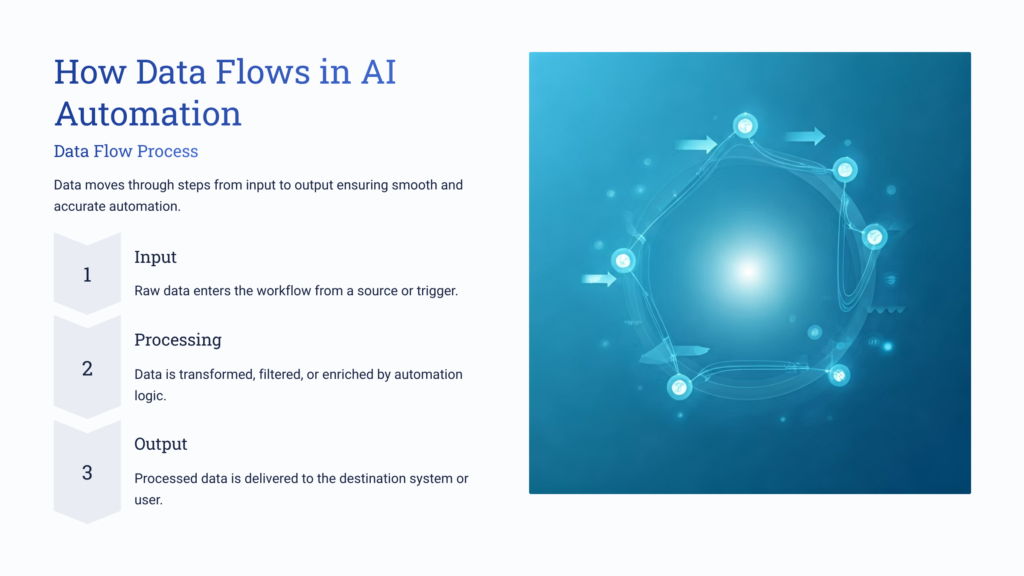
Data flow is a critical part of AI automation. It determines how information moves from one step to another within a workflow.
The process typically starts with data input, followed by processing, and ends with output actions. Each stage is connected, ensuring smooth and continuous operation.
Proper data flow ensures that:
- Information is not lost
- Tasks are completed accurately
- Systems remain synchronized
Advantages of AI Automation
AI automation offers several benefits that make it an essential tool in modern workflows.
Increased Efficiency
Automation eliminates repetitive tasks, allowing processes to be completed faster.
Time Savings
Tasks that would normally take hours can be completed in seconds.
Reduced Errors
Automated systems minimize the chances of human error.
Scalability
Automation can handle increasing workloads without requiring additional resources.
Continuous Operation
Automated workflows can run even when users are not actively managing them.
Simplifying Complex Processes
One of the biggest misconceptions about AI automation is that it is complicated. While the concept may seem advanced, modern tools simplify the process through visual interfaces and predefined modules.
Users can create complex workflows without writing code. This makes automation accessible to a wider audience, including beginners.
Scheduling and Control in Automation
Automation systems allow users to control when and how workflows run. This includes setting schedules and defining conditions for execution.
Workflows can be configured to run:
- At fixed intervals
- After specific events
- Based on user actions
This flexibility ensures that automation aligns with individual needs.
Monitoring and Performance Tracking
Once a workflow is active, it is important to monitor its performance. Most automation platforms provide insights into how tasks are being executed.
Users can track:
- Number of operations performed
- Success and failure rates
- Execution time
This helps in optimizing workflows and improving efficiency over time.
The Future of AI Automation
AI automation is continuously evolving, with new capabilities being introduced regularly. As technology advances, automation systems are becoming more intelligent and capable of handling complex tasks.
The integration of AI with automation is opening new possibilities, enabling systems to not only perform tasks but also make decisions based on data.
This evolution is making AI automation an indispensable tool for individuals and businesses alike.
Conclusion
AI automation represents a significant shift in how tasks are managed and executed. By combining artificial intelligence with workflow automation, it enables systems to operate efficiently and independently.
From creating scenarios to managing operations and designing workflows, AI automation simplifies complex processes and enhances productivity. It allows users to focus on more important tasks while routine operations are handled automatically.
As the adoption of AI continues to grow, understanding and implementing automation will become increasingly important. It is not just a technological advancement but a practical solution for improving efficiency and achieving better results in everyday operations.

Related Posts