Hello friends, in this article we are going to understand in detail what Advantage+ Creative is in Meta Ads, how it works, where it appears in Meta Ads Manager, and how each enhancement option affects your ad creative.
Understanding the Structure of a Meta Ads Campaign
Before learning Advantage+ Creative, it is important to understand the basic structure of an ad campaign in Meta Ads Manager.
A Meta ad campaign is divided into three levels:
In this scenario:
- There is a single ad campaign
- Inside the campaign, there is one ad set
- Inside that ad set, there is one ad creative
Advantage+ Creative is configured only at the Ad (Creative) level, not at the campaign or ad set level.
Reaching the Ad Creative Level in Meta Ads Manager
While creating a new campaign, after completing:
- Campaign objective selection
- Ad set targeting and budget settings
You reach the Ad Creative section. This is the section where you design the actual advertisement that users will see, such as images, videos, text, headlines, and call-to-action buttons.
This is where the Advantage+ Creative feature becomes available.
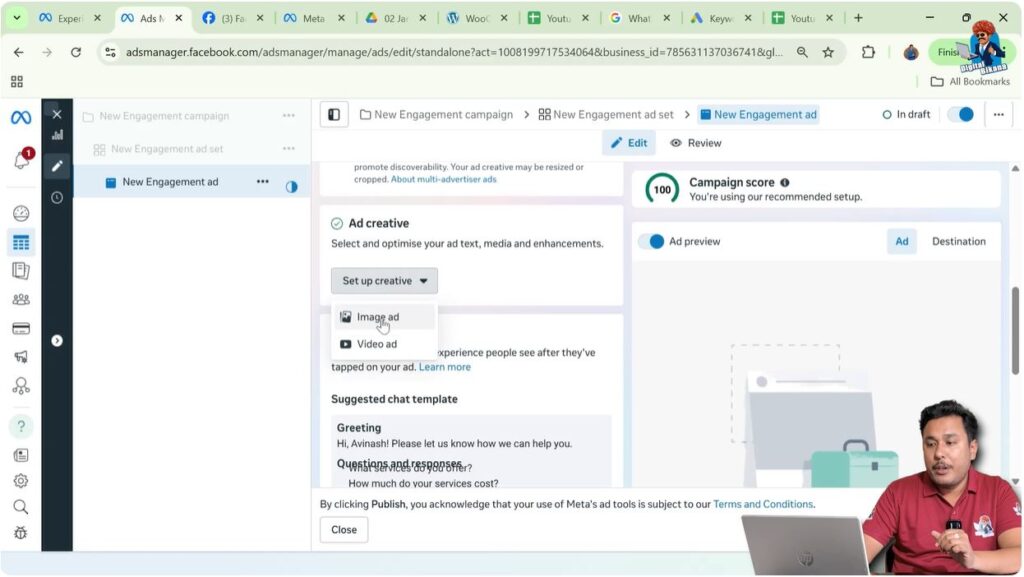
Step 1: Opening the Ad Creative Section
At the ad creative level, you will see a section named Ad Creative.
Here, you are asked to set up the creative for your advertisement. This section controls how your ad looks visually and how it communicates with users.
When you click on Set Up Creative, Meta asks you to choose the creative format.

Step 2: Choosing the Creative Format
Inside the creative setup, Meta provides options such as:
- Image ad
- Video ad
If you select Image Ad, you can upload:
- A banner
- A post
- Any visual creative that you want to showcase as an advertisement
This is the most common format where Advantage+ Creative enhancements are applied.
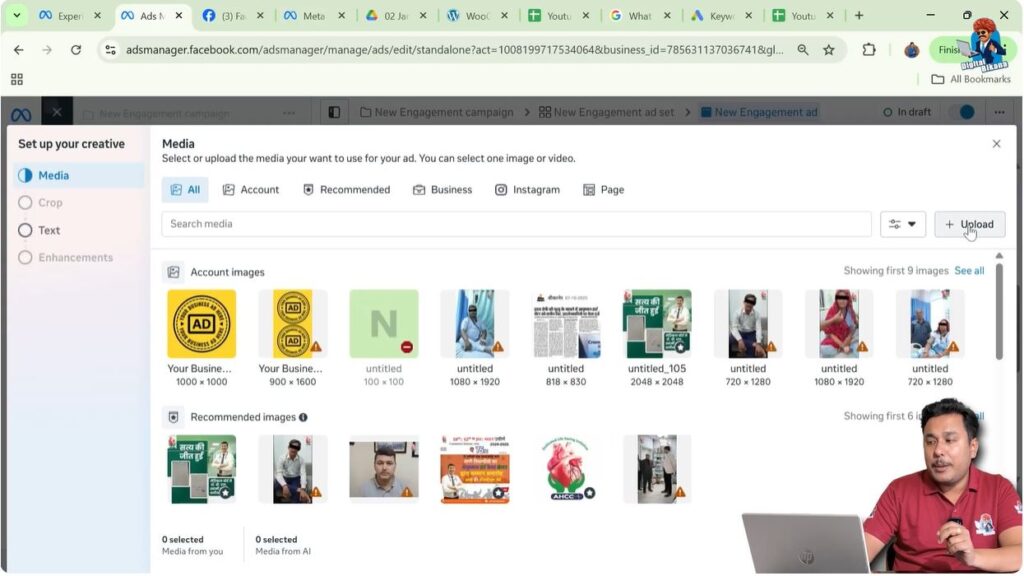
Step 3: Uploading the Banner or Image
After selecting the image ad option, you can upload your banner.
In this case:
- The banner is already uploaded
- You select the banner
- You click Next
- Then click Next again
- And again click Next
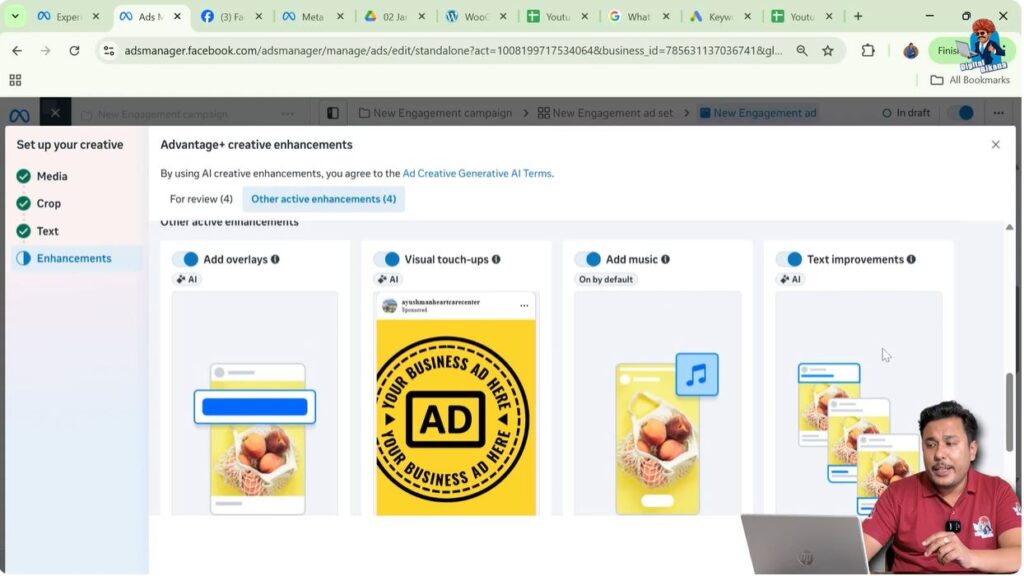
After completing these steps, you reach the section where Advantage+ Creative Enhancements are displayed.
Understanding Advantage+ Creative Enhancements
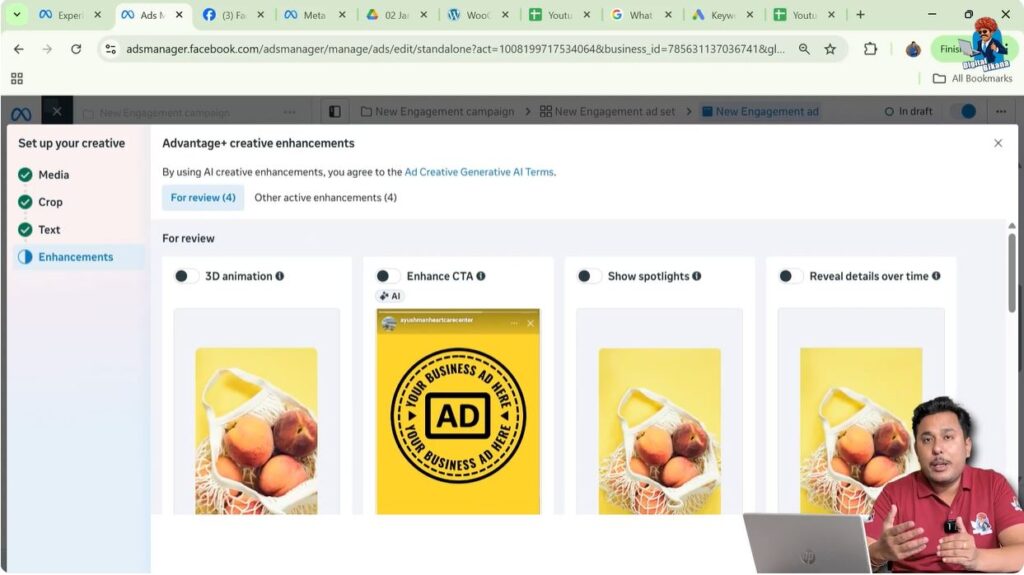
At this point, Meta shows a message stating that it can enhance your image, banner, or post using AI technology. This entire enhancement system is called Advantage+ Creative.
Meta’s AI analyzes your creative and applies different enhancement options to potentially improve performance.
What Is Advantage+ Creative?
Advantage+ Creative is an AI-powered feature that automatically enhances your ad creative in different ways, such as:
- Adding motion effects
- Enhancing call-to-action visibility
- Applying visual adjustments
- Improving ad text
- Adding music
These enhancements are optional and can be controlled manually.
Step 4: 3D Animation and Motion Effects
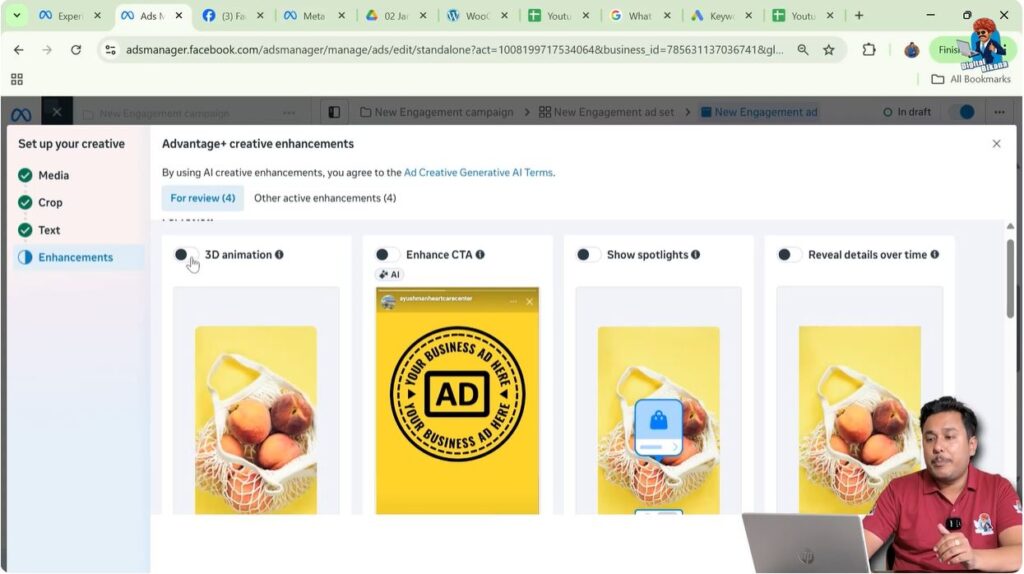
One of the first enhancement options is 3D animation.
What This Enhancement Does
- Adds zoom-in and zoom-out effects
- Converts a static banner into a dynamic visual
Practical Impact
During zoom-in or zoom-out:
- The edges of the banner may get cut
- Important design elements near the edges may be lost
This can affect banners where the design is tightly aligned or where text and visuals are placed near the corners.
Step 5: CTA Button Enhancement
Another enhancement available under Advantage+ Creative is CTA (Call-To-Action) button enhancement.
What This Enhancement Does
- Makes the CTA button more prominent
- Displays the CTA dynamically
- The button may appear from the bottom
Practical Impact
If your main banner content is placed near the bottom:
- The CTA button may overlap your content
- This overlap can reduce clarity or visual balance
Because of this, CTA enhancement may not suit all banner designs.

Step 6: Spotlight Effects on the Banner
Advantage+ Creative also offers a spotlight feature.
What This Enhancement Does
- Shows a spotlight icon or visual element
- Appears after a few seconds of viewing
Practical Impact
This feature is meant to draw attention, but:
- It may distract from the original design
- It may not match the brand’s creative style
Its effectiveness depends on the type of creative being used.

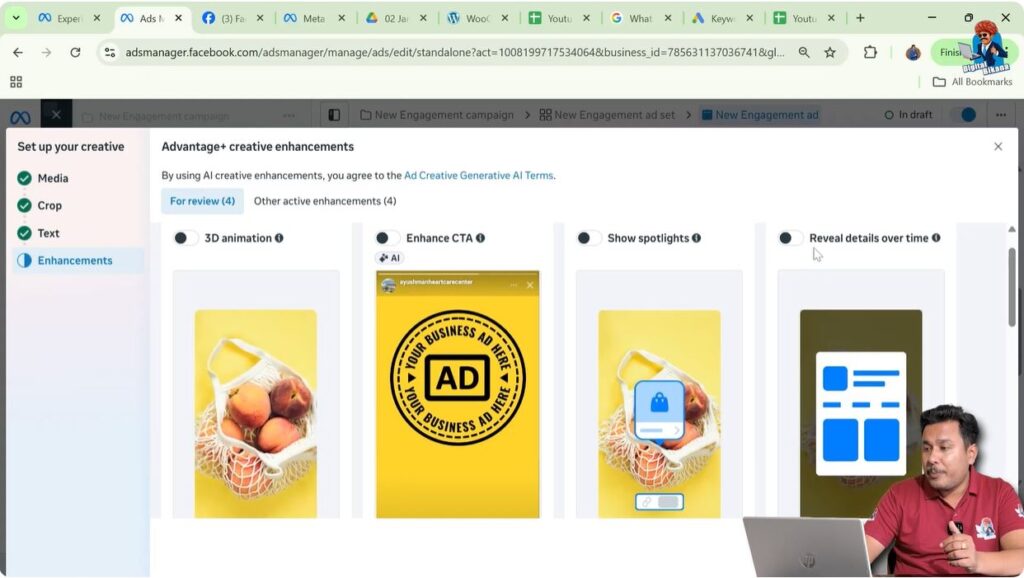
Step 7: Reveal Details Over Time
Another enhancement is Reveal Details Over Time.
What This Enhancement Does
- Gradually reveals information
- Displays product catalog elements
- Shows additional details as time passes
Practical Impact
This can be useful for:
- Product-based ads
- Catalog-style creatives
However, it may not be suitable for simple brand banners or static promotional creatives.
Step 8: Adding Overlays to the Banner
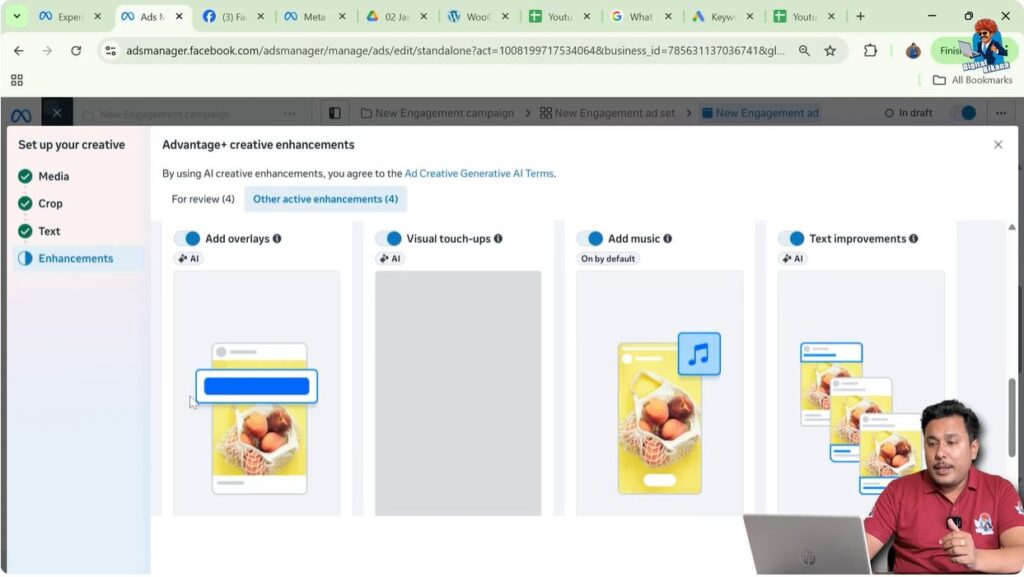
Advantage+ Creative allows adding overlays.
What This Enhancement Does
- Displays headlines over the banner
- Places text elements on top of visuals
Practical Impact
If your banner already contains text:
- Overlays can make it cluttered
- It can reduce readability
This option should be used carefully to avoid visual overload.
Step 9: Visual Touch-Ups Using AI
Meta also applies visual touch-ups as part of Advantage+ Creative.
What This Enhancement Does
- Increases brightness
- Adjusts contrast
Practical Impact
While these adjustments aim to improve visibility:
- They may change the natural tone of the image
- The original look and feel of the banner may be altered
For creatives where color accuracy and mood matter, this enhancement can be obstructive.

Step 10: Adding Music to the Creative
Another available option is adding music.
What This Enhancement Does
- Adds background music to the banner
- Enhances engagement in placements with sound
Practical Impact
This can be beneficial when:
- Running ads in video-friendly placements
- You want a more immersive experience
Among all enhancements, this option is often the least disruptive.

Step 11: Improving Ad Text Using AI
One of the most important features of Advantage+ Creative is text improvement.
What This Enhancement Does
- Improves primary text
- Enhances headlines
- Refines descriptions
Practical Impact
If there are:
- Grammatical mistakes
- Sentence structure issues
Meta’s AI automatically corrects them. This is particularly helpful for advertisers who want error-free ad copy.
How Advantage+ Creative Uses AI
Advantage+ Creative uses Meta’s AI technology to:
- Analyze visual elements
- Understand text structure
- Apply enhancements dynamically
The goal is to make ads more engaging and optimized for different placements.
Should You Use Advantage+ Creative?
This leads to an important question: Should you use Advantage+ Creative or not?
Considerations Before Using
- Zoom effects may crop banner edges
- CTA overlays may block important content
- Visual touch-ups may reduce originality
Because of these factors, using all enhancements by default may not always be beneficial.
Selective Use of Enhancements
The best part of Advantage+ Creative is control.
You can:
- Turn off enhancements you do not want
- Keep only the enhancements you need
For example:
- You can turn off animations, overlays, and visual touch-ups
- Keep only the music or text improvement option enabled
This gives you flexibility without harming your creative design.
Step 12: Turning Enhancements On or Off Manually
Each Advantage+ Creative option can be:
- Enabled individually
- Disabled individually
This allows advertisers to:
- Experiment safely
- Protect the integrity of their banner
- Use AI only where it adds value
When Advantage+ Creative Can Be Useful
Advantage+ Creative can be useful when:
- You want minor improvements
- You need grammar correction
- You want to add music without redesigning the banner
It works best when used selectively rather than fully automated.
Final Understanding of Advantage+ Creative
Advantage+ Creative is an AI-powered creative enhancement system in Meta Ads that can modify visuals, text, and engagement elements automatically.
It offers features such as:
- Motion effects
- CTA enhancements
- Visual adjustments
- Music addition
- Text correction
However, it is not mandatory to use all features.
Final Conclusion
Advantage+ Creative in Meta Ads is designed to enhance ad creatives using AI technology, but it should be used thoughtfully. Some enhancements may improve engagement, while others may negatively affect the original design.
The best approach is to:
- Review each enhancement carefully
- Turn off options that do not suit your banner
- Use only those features that align with your creative and advertising goals
By doing this, you can take advantage of Meta’s AI capabilities while maintaining full control over how your ads look and perform.

Related Posts