Hello friends, in this article we are going to understand in detail whether you can use music in your Meta ads or not, what kind of music is allowed, what risks are involved with copyrighted music, and how to properly add music to your ad creative using Meta Ads Manager. Music can make ads more engaging and emotionally appealing, but using the wrong music can create serious legal issues. That is why it is very important to clearly understand this concept before adding music to any ad campaign. This article explains the complete process step by step, exactly in the same order as it appears while creating a Meta ad campaign.
Understanding the Importance of Music in Advertising
Music plays a powerful role in advertising. It helps in:
- Creating emotional connection
- Improving attention span
- Making ads more memorable
However, music is also protected by copyright laws, which means it cannot be used freely in advertisements unless you have proper rights.
Copyright and Music Usage in Ads
Why You Cannot Use Any Music in Ads
You cannot use every type of music in your ad campaigns. Most songs, background tracks, and commercial music are protected by copyright.
If you use copyrighted music in your advertisement:
- The copyright owner can claim your ad
- Your ad account may receive a copyright strike
- Your ad may be taken down
- Legal action can be taken, including court cases
Copyright owners have full legal rights to protect their music, especially when it is used for commercial or advertising purposes.
When Is Music Allowed in Ads?
Music can be safely used in ads only in these cases:
- The music is created by you
- You have legal permission or license to use the music
- The music is taken from a platform-provided advertising music library
To help advertisers avoid copyright issues, Meta provides its own music library that is approved for advertising use.
Meta Ads Music Library: A Safe Solution
Meta Ads Manager provides a built-in music library where:
- All available music is copyright-safe
- Music is approved for advertising usage
- There is no risk of copyright claims or strikes
This library is integrated directly into the ad creation flow, making it easy and safe to add music to your ad creative.
Where Music Can Be Added in Meta Ads Manager
Music can be added only at the Ad Creative level, not at:
Music is added through the Advantage+ Creative Enhancements section while designing the ad.
How to use Music in Meta Ads?
Step 1: Opening Meta Ads Manager
The first step is to log in to Meta Ads Manager.
Once logged in:
- You will see the Ads Manager dashboard
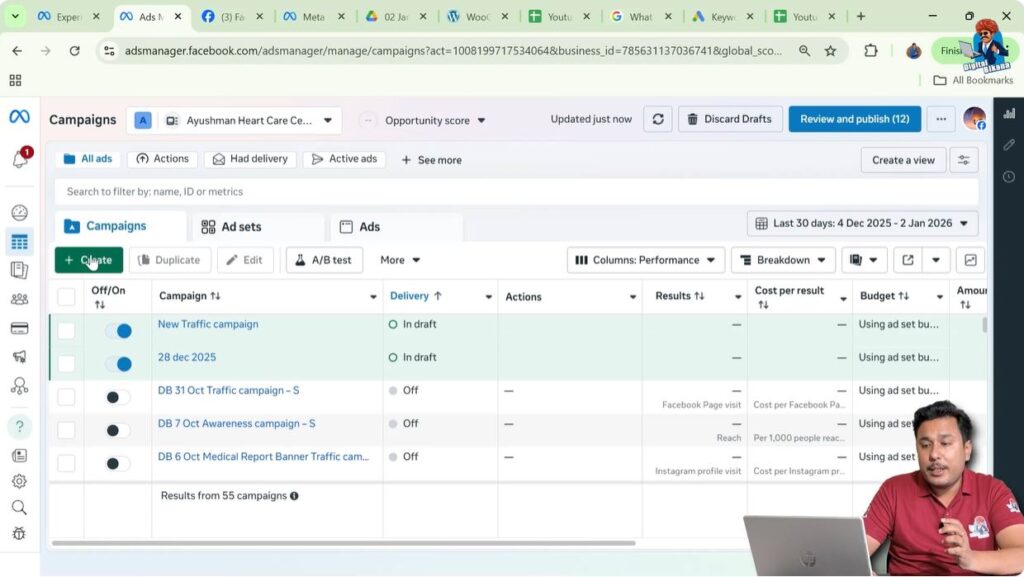
- Click on the Create button to start a new ad campaign

Step 2: Creating a New Campaign
After clicking Create:
- Select any campaign objective
- The objective selection does not affect music usage
- Click on Continue
This moves you into the campaign setup process.
Understanding the Campaign Creation Flow
The Meta ad creation process follows a fixed structure:
Music can be added only at the Ad Creative level.
Step 3: Reaching the Ad Creative Level
After completing:
- Campaign objective selection
- Ad set settings like audience, placements, and budget
You will reach the Ad Creative section.
This is where you design:
- The banner or image
- The ad text
- Headline
- Call-to-action button
This is also where music options become available.
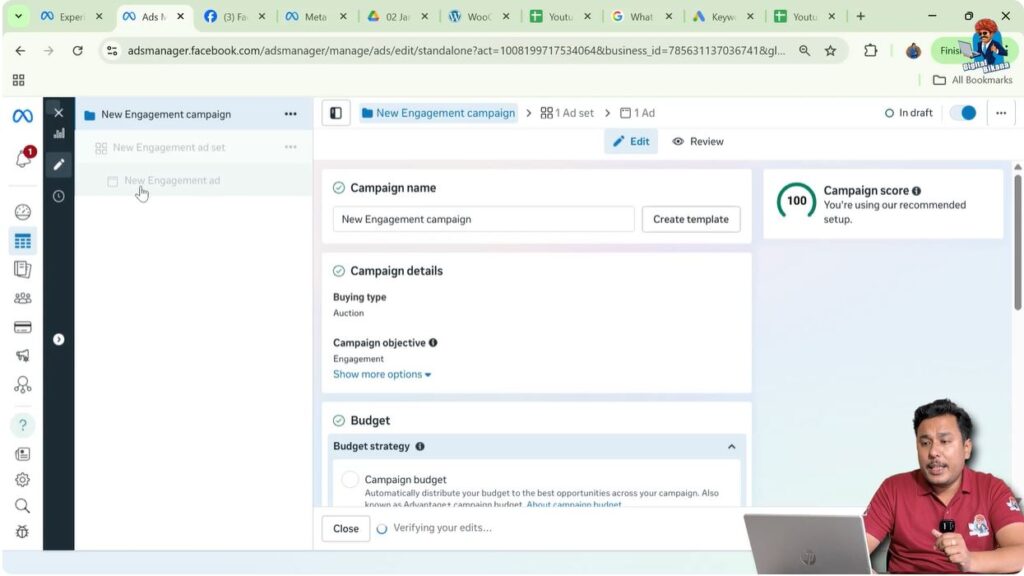
Step 4: Opening Set Up Creative
At the ad creative level:
- Click on Set Up Creative
This option allows you to define the creative format and upload your ad visuals.

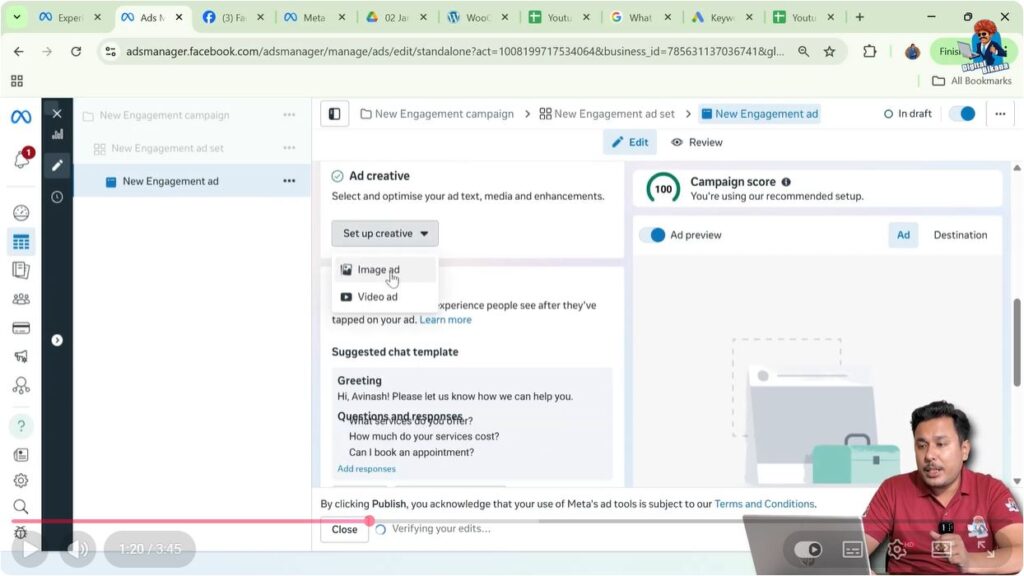
Step 5: Choosing the Creative Format
After clicking Set Up Creative, Meta asks you to select the creative format.
Available options include:
- Image ad
- Video ad
For this process, select Image Ad.
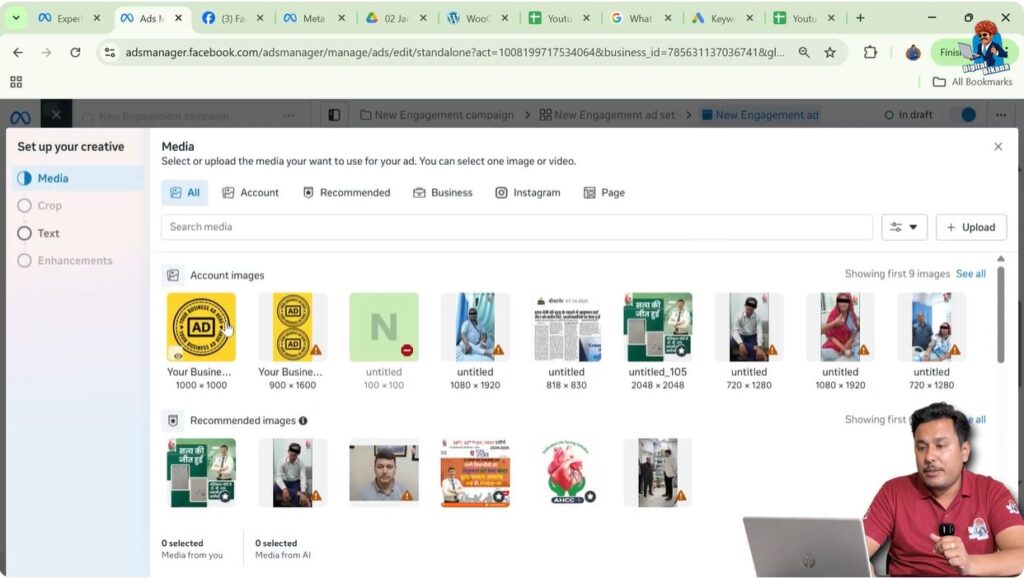
Step 6: Uploading the Banner or Image
After selecting Image Ad:
- Upload the banner you want to advertise
In this case:
- The banner is already uploaded
- Simply select that banner
Once selected:
- Click Next
- Click Next again
This confirms your creative selection.
Step 7: Reaching Advantage+ Creative Enhancements
After clicking Next, you will reach the Advantage+ Creative Enhancements section.
This section allows Meta to apply AI-based enhancements to your banner, including:
- Music
- Visual effects
- CTA enhancements
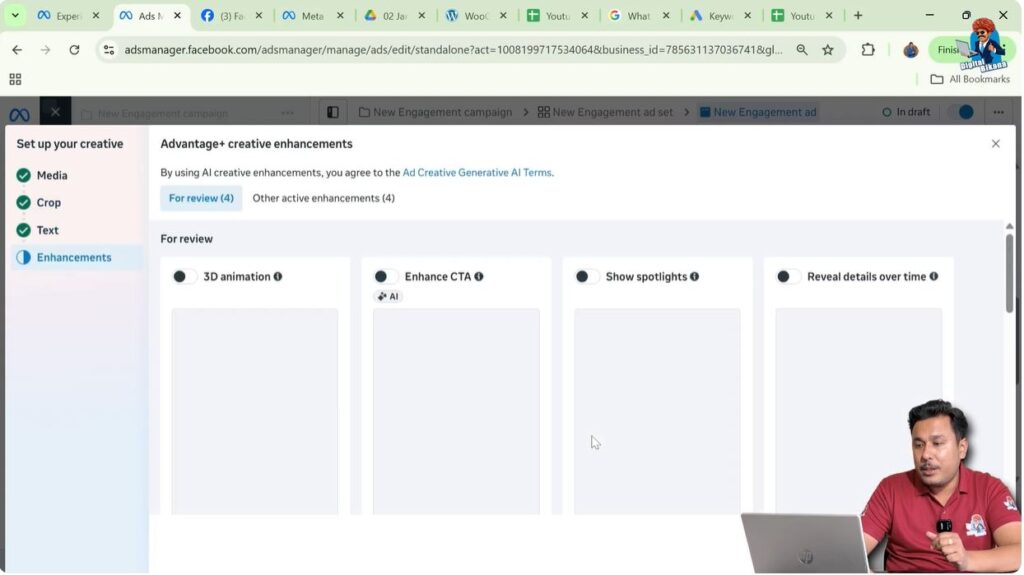
Understanding Advantage+ Creative Music Option
Within Advantage+ Creative Enhancements, you will find an option to add music.
This is the only place where music can be added safely to your ad creative.
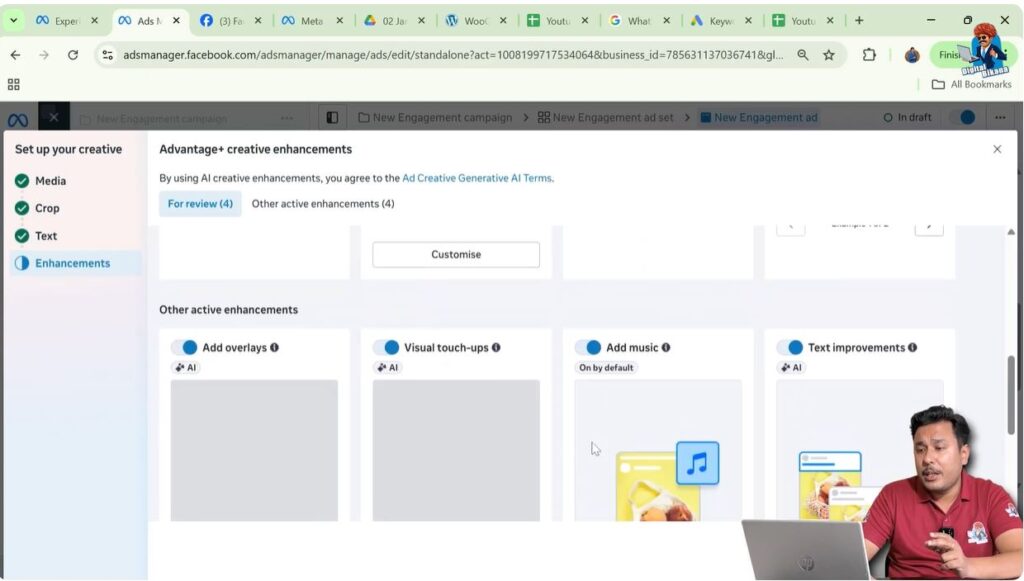
Step 8: Clicking on Customize Music Option
Inside the music section:
- Click on the Customize button
This opens the music configuration panel.

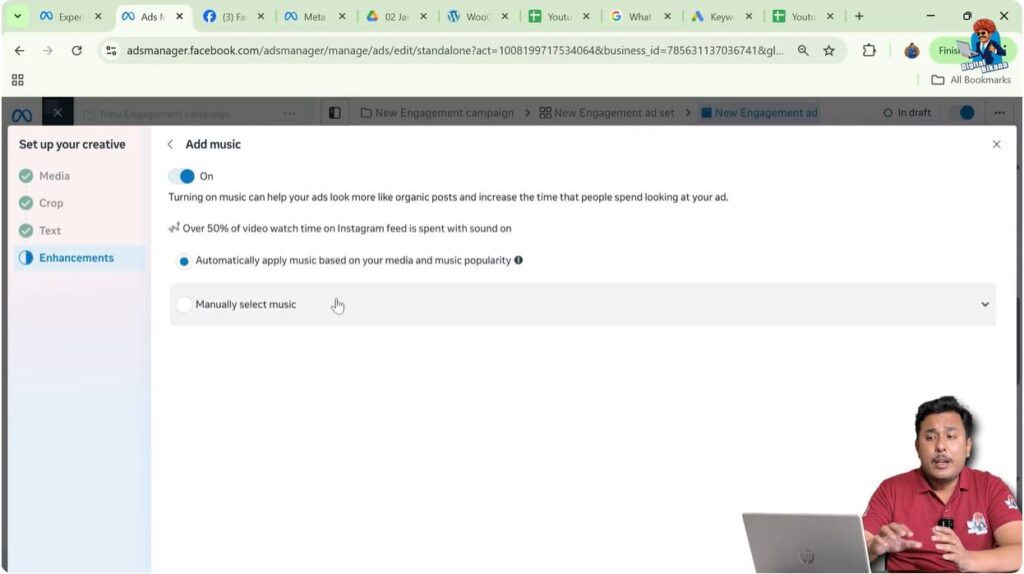
Automatic Music Selection by Meta
What Automatic Music Does
Meta provides an option to:
- Automatically apply music based on your media and music popularity
If this option is enabled:
- Meta selects music automatically
- Music is chosen based on the type of banner or content you are promoting
- Popular and trending music from Meta’s approved library is applied
This is useful if you do not want to manually select music.
Step 9: Manual Music Selection
If you want full control over music selection:
- Click on Manually Select Music
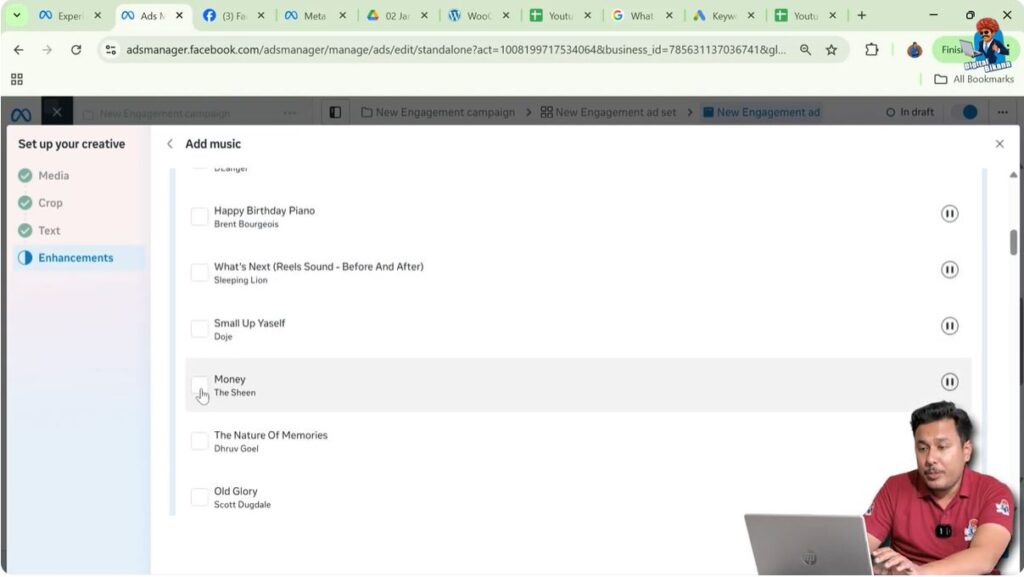
This allows you to browse Meta’s music library.
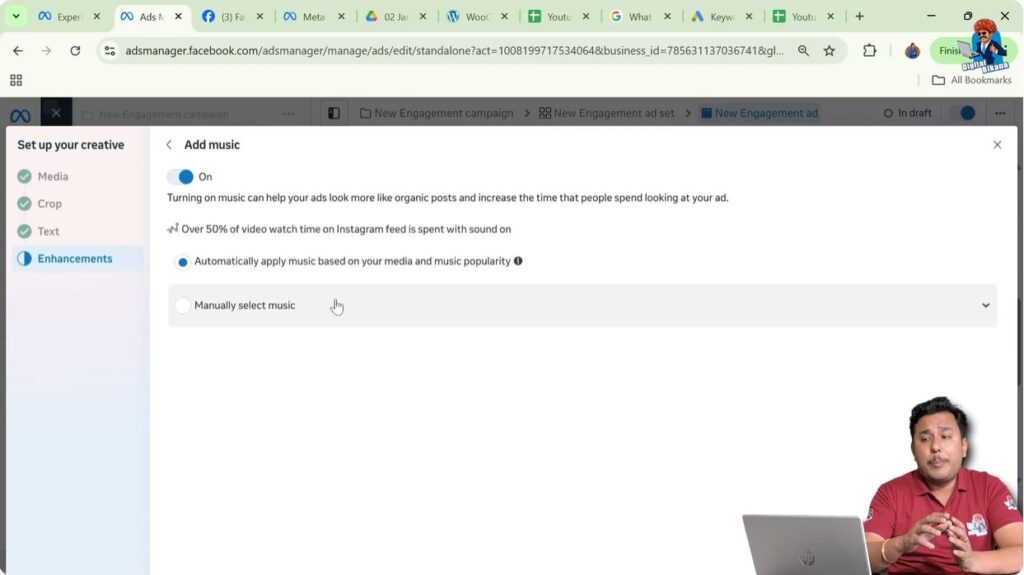
Understanding Meta’s Music Library Limitations
When browsing the music library, you will notice that:
- Regional music may not be available
- Bollywood or commercial songs are not present
- Copyrighted popular songs cannot be searched
This is intentional, because such music cannot be legally used in advertisements without permission.
Only music that is approved for advertising appears in this library.
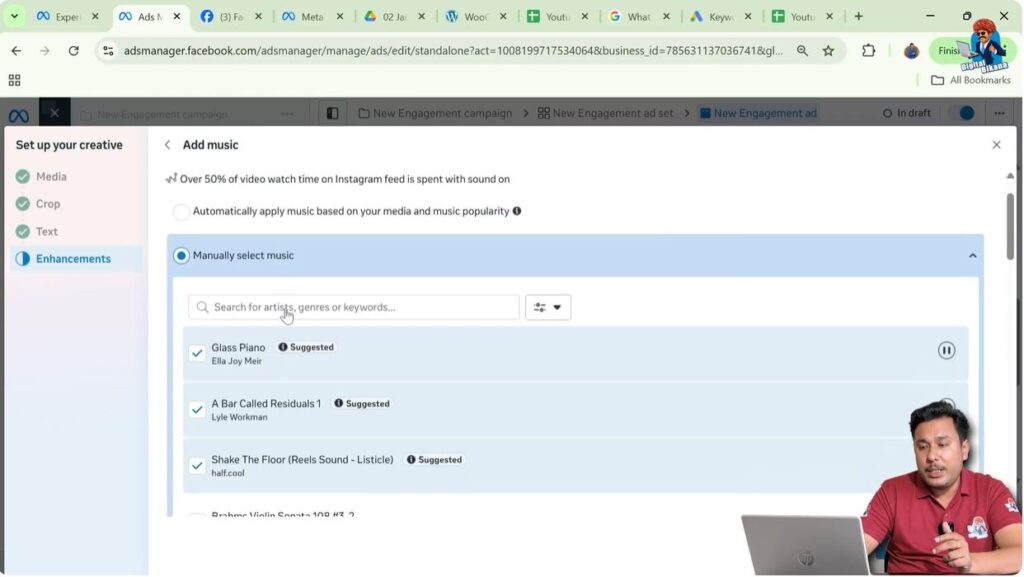
Step 10: Searching and Selecting Music
To add music manually:
- Search for music inside the library
- Preview available tracks
- Select the music you want
You can also:
- Uncheck other music suggestions added by Meta
- Keep only your selected music
Once done:
- Go back to the enhancements section
Step 11: Applying Music to the Ad Creative
After selecting the music:
- The music is applied to your banner
- The ad will now play with background music
You can review how the music feels with your creative.
Optional: Turning Music On or Off
At any point:
- You can turn off music if you change your mind
- You can switch between automatic and manual music
This gives you flexibility and control.
Important Things to Remember About Music in Ads
Never Use Copyrighted Music Manually
Do not upload or add copyrighted songs from:
- Bollywood
- Albums
- Movies
- Commercial tracks
Unless you have legal permission.
Always Use Safe Music Sources
Use only:
- Music created by you
- Music licensed for advertising
- Meta’s built-in music library
Benefits of Using Meta’s Music Library
Using Meta’s music library ensures:
- No copyright risk
- Smooth ad approval
- No legal complications
- Safe long-term advertising
Common Mistakes to Avoid
Some common mistakes advertisers make include:
- Assuming any music can be used
- Searching for popular songs in the library
- Ignoring copyright rules
- Uploading copyrighted audio externally
Avoiding these mistakes keeps your ad account safe.
When Music Works Best in Ads
Music works best when:
- Ads are shown in video-friendly placements
- You want emotional engagement
- The music matches the brand tone
However, music is optional and not mandatory for every ad.
Final Understanding of Music Usage in Meta Ads
You cannot use random or copyrighted music in Meta ads.
Music can be used only if:
- It is created by you, or
- It is selected from Meta’s approved music library
Meta Ads Manager provides both:
- Automatic music selection
- Manual music selection
Through Advantage+ Creative Enhancements.
Final Conclusion
Music can enhance ad performance, but only when used correctly and legally. Copyright violations can result in serious consequences, including ad rejection, account issues, and legal action.
The safest and smartest way to use music in Meta ads is by using Meta’s built-in music library available inside Advantage+ Creative Enhancements.
By following the correct step-by-step process explained above, you can confidently add music to your ad creatives while keeping your ads compliant, professional, and effective.

Related Posts